Showing posts with label available. Show all posts
Showing posts with label available. Show all posts
Friday, October 4, 2013
Phone 4 Baseband Chip Downgrade from 4 11 08 to 4 10 01 Service Now Available
I am not selling this, But providing information to the interested persons of these options they can do themselves or pay for someone to do.
Baseband downgrade from 4.11.08 to 4.10.01 via chip replacement is now possible on iPhone 4.

My team and I would like to present sort of a good news for those who are currently stuck on baseband 4.11.08 as we managed to downgrade an iPhone 4′s baseband from 4.11.08 to 4.10.01 on 22 October, 2011.
However, it’s still now possible to downgrade to 1.59.00 to make it unlockable with ultrasn0w.
It’s similar to our baseband chip replacement service for 3G and 3GS, but this method requires two different chips to be replaced – the Infineon X-GOLD 618 processor chip and the 128MB NOR flash chip.
Once your iPhone 4 baseband has been downgraded to 4.10.01, you can then unlock it with a Turbo SIM.
There are a few tiny setbacks with this method – your iPhone serial number and IMEI will change. That means you can only hacktivate (activate) it with redsn0w or use custom hacktivated firmware in order to do a full restore. However, it is still possible to use original firmware to restore your iPhone 4 if you ever need to; unlike iPhone 3G/3GS on baseband 6.15.00 which doesn’t allow you to restore at all.
=x=x=x=x=x=x=x=x=x=x=x=x=x=x=x=
If you are stuck on baseband 4.11.08 which presently cannot be unlocked with ultrasn0w or a Turbo SIM, this is the service for you. It is similar to our popular iPhone 3GS baseband chip replacement service.
Once your iPhone 4s baseband is downgraded to 4.10.01, you can unlock it with a FREE Gevey Turbo SIM which is included in this service.
There are two chips that need to be replaced in order to downgrade your iPhones baseband.
Service price breakdown:
Baseband downgrade from 4.11.08 to 4.10.01 via chip replacement is now possible on iPhone 4.

My team and I would like to present sort of a good news for those who are currently stuck on baseband 4.11.08 as we managed to downgrade an iPhone 4′s baseband from 4.11.08 to 4.10.01 on 22 October, 2011.
However, it’s still now possible to downgrade to 1.59.00 to make it unlockable with ultrasn0w.
It’s similar to our baseband chip replacement service for 3G and 3GS, but this method requires two different chips to be replaced – the Infineon X-GOLD 618 processor chip and the 128MB NOR flash chip.
Once your iPhone 4 baseband has been downgraded to 4.10.01, you can then unlock it with a Turbo SIM.
There are a few tiny setbacks with this method – your iPhone serial number and IMEI will change. That means you can only hacktivate (activate) it with redsn0w or use custom hacktivated firmware in order to do a full restore. However, it is still possible to use original firmware to restore your iPhone 4 if you ever need to; unlike iPhone 3G/3GS on baseband 6.15.00 which doesn’t allow you to restore at all.
=x=x=x=x=x=x=x=x=x=x=x=x=x=x=x=
If you are stuck on baseband 4.11.08 which presently cannot be unlocked with ultrasn0w or a Turbo SIM, this is the service for you. It is similar to our popular iPhone 3GS baseband chip replacement service.
Once your iPhone 4s baseband is downgraded to 4.10.01, you can unlock it with a FREE Gevey Turbo SIM which is included in this service.
There are two chips that need to be replaced in order to downgrade your iPhones baseband.
Service price breakdown:
- Pre-programmed Infineon Baseband Chip X618 with baseband version 4.10.01: US$68.00
- Intel 36My1EF 128MB NOR chip: US$37.00
- Labor charge: US$23.00
- Gevey Blue Turbo SIM worth US$44.95 (112-free, no SIM card cutting required): FREE
- Worldwide standard shipping (up to 21 business days, trackable online): FREE
- China domestic first class express shipping: FREE
- 30-days warranty
- USA
- Canada
- Australia
- New Zealand
- Japan
- Western Europe including Republic of Ireland and United Kingdom
- Japan
- Malaysia
- Singapore
- Your iPhones serial number and IMEI will change - this means you can only activate your iPhone using redsn0w or hacktivated custom firmware
- You can restore to stock firmware without any issue but the point above (activating using redsn0w) still applies
- All other functionalities will not be affected
- We are offering the only workable solution in the planet but only purchase this service if you have considered all options and understood everything

Saturday, September 28, 2013
AVG Antivirus Free 2013 download available
AVG Technologies today has released the annual update for their AVG Free Antivirus 2013 security application for Windows introducing new and improved features as well as a new user interface. AVG Anti-virus Free is one of the most popular free antivirus solutions for Windows PCs. It has grown in recent years from an application that was designed purely to protect the system from malicious software, to a program that does a lot more than just that. Critics say the program has become bloated because of that and there is certainly some truth to that when you look at the included modules:
- Antivirus protection
- Email Scanner
- Linkscanner
- Social Networking Protection
- Do Not Track
- Identity Protection
- WiFi Guard
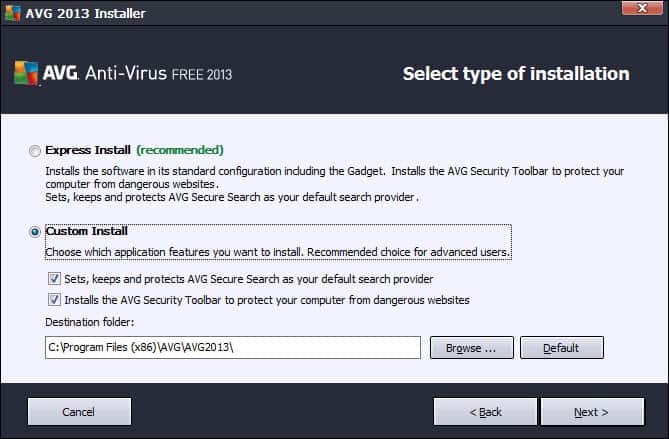
Good news is that you can disable several of the modules that you do not need during installation, so that they won’t be installed along with the core antivirus app. You can block the installation of the AVG gadget, personal e-mail scanner, identity protection and AVG Surf-Shield during installation.
Bad news that the installer contains offers to install AVG Secure Search as the default search provider and the AVG Security toolbar in supported web browsers. To avoid this, select custom install and make sure the items are unchecked before you proceed with a click on next.
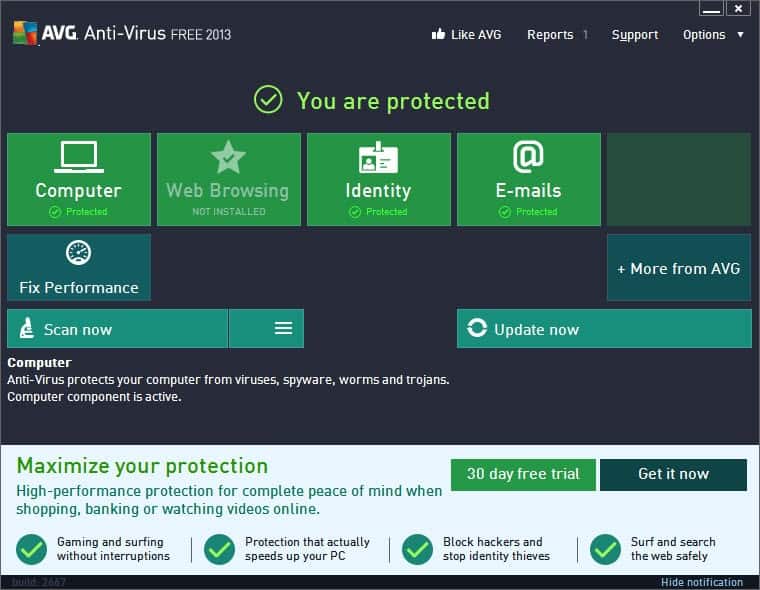
First thing you will notice when you start the program is the new user interface that displays the protection status and links to core program features.
You do find advertisement for the company’s own Antivirus 2013 and Internet Security scattered throughout the interface. About a fifths of the interface is reserved for ads that highlight some of the benefits of upgrading to one of the company’s commercial offerings. AVG thankfully included an option to hide that notification so that it does not get into your way all the time.
You will also find upgrade hints in various modules. The email scanner for instance highlights that spam protection is available in the commercial products on top of the email scanning of the free version.
So what is new in AVG Antivirus Free 2013?
We have previously mentioned that AVG Linkscanner has been discontinued and replaced by AVG Secure Search. The tool is available as a standalone download and also as part of the latest Antivirus free iteration. It is basically Linkscanner plus the AVG Security Toolbar, and – optional – changes to the browser’s default homepage and search provider. You can disable the inclusion by selecting the custom install option.
WiFi Guard is another new feature, which according to AVG, “helps you avoid rogue Wifi access points used by hackers by alerting you when your PC tries to access such a network”. Windows may connect your PC to a wireless network that you have been connected to in the past if it has the same name, even though it may not be the same network. WiFi Guard will recognize this for you and display a notification so that you have time to disconnect from the network. This module has actually been included in AVG 2012 updates.
Do not track is another feature that AVG introduced in a 2012 lineup update. It informs AVG users about data collected by Internet sites. The feature collects information about ad networks, social buttons and web analytics that you come across on the Internet, giving you options to block some or all of the scripts from your browser to protect yourself from being tracked by the scripts.
AVG Antivirus Free 2012 includes the following additional changes and improvements:
- Reduced footprint while running when compared to the 2012 release
- Better detection algorithm
- File reputation, a cloud based service that improves the program’s detection capabilities
The program is a bit heavy on the notification side of things. You can disable some or all notifications, e.g. scan finished, under Options > Advanced Settings. Here you can also disable the boot time improvement notifications that you may see on reboots or new starts of the system.
Here is a video that is announcing the new version and the thought process behind it.
Download
AVG Antivirus Free 2013 is available as a web installer and offline installer. The web installer has a size of 4 Megabytes and will download the rest of the installation files from the Internet during installation. The offline installer is available as a 32-bit and 64-bit version, with a size of 118 Megabytes and 130 Megabytes respectively, that includes all components and does not require an Internet connection during installation. Both versions can be downloaded on this page.
Processes
AVG uses several processes while running. You need to enable Show processes from all users to display them all. Please note that you may have additional or less processes depending on the modules that you have installed with the program:
- avgcsrva.exe – the core scanning module, server part
- avgemca.exe – the email scanner
- avgidsagent.exe – the identity protection service
- avgnsa.exe – AVG online shield service and resident shield service
- avgui.exe – user interface, only process running under the user account
- avgwdsvc.exe – watchdog service
Closing Words
The new interface is definitely a step in the right direction, as are the options to block certain modules from being installed with the program. I’d highly suggest to use a custom install to remove all the security modules and offers that you do not want installed on your system.
Name Version Type Date Size AVG for Windows
AVG Online Installer2013.2677 exe September 18, 2012 4 MB AVG for Windows (32bit)
(avg_free_x86_all_2013_2677a5774.exe)2013.2677 exe September 18, 2012 114 MB AVG for Windows (64bit)
(avg_free_x64_all_2013_2677a5774.exe)2013.2677 exe September 18, 2012 125 MB
5 REASONS TO CHOOSE AVG
- Over 100 million people trust our people-powered protection.
- We’re rated #1 in threat detection by independent antivirus testing labs.*
- It’s easy to install and use.
- Our 30-day money back guarantee means your purchase is risk free.
- Free technical support and updates to latest versions throughout your subscription term.
*AVG Internet Security was rated Number 1 in threat detection by AV-Test Org May-August 2010.
What people say
"Downloaded the upgrade version of AVG Internet Security last week. Definitely the best security system in the world. I would recommend it to anyone. Very easy to install and run. Your updates are now done without me knowing, with no pop ups as there was with the older version. Keep up the good work."
Mike McHugh

Thursday, September 26, 2013
Free legal Siri port for all jailbroken iOS 5 devices now available
Following our multiple looks at private Siri ports to unsupported iOS 5 devices with the help of developer Steven Troughton-Smith, Chpwn and Ryan Petrich went public today with a Siri port called Spire.
The port mirrors all the iPhone 4S Siri functionality and works on the jailbroken iPhone 4, iPhone 3GS, third generation iPod touch, fourth generation iPod touch, and first generation iPad. We previously revealed that iPod touch Siri performance is not on par with iPhone Siri performance due to the lower quality microphone system.
Spire is available free on the Cydia jailbroken application market, and the download comes in at approximately 100mb, according to a blog post from Chpwn. The developers recommend that users connect to a Wi-Fi network for downloading, not a standard cellular network, because of the large file size.
A few Siri ports have gone public through jailbreak application markets in the past few weeks, but they were deemed unsafe and illegal by the development community due to its distribution of Apple copyrighted materials.
“Spire uses a new method to obtain the files necessary for Siri, so it doesn’t have the copyright issues encountered by previous attempts,” said Chpwn
Of course, with any port of this kind, there will be a caveat: you have to still gain authorization through your own server and an iPhone 4S. Chpwn explained the issue:
The port mirrors all the iPhone 4S Siri functionality and works on the jailbroken iPhone 4, iPhone 3GS, third generation iPod touch, fourth generation iPod touch, and first generation iPad. We previously revealed that iPod touch Siri performance is not on par with iPhone Siri performance due to the lower quality microphone system.
Spire is available free on the Cydia jailbroken application market, and the download comes in at approximately 100mb, according to a blog post from Chpwn. The developers recommend that users connect to a Wi-Fi network for downloading, not a standard cellular network, because of the large file size.
A few Siri ports have gone public through jailbreak application markets in the past few weeks, but they were deemed unsafe and illegal by the development community due to its distribution of Apple copyrighted materials.
“Spire uses a new method to obtain the files necessary for Siri, so it doesn’t have the copyright issues encountered by previous attempts,” said Chpwn
Of course, with any port of this kind, there will be a caveat: you have to still gain authorization through your own server and an iPhone 4S. Chpwn explained the issue:
However, Spire is not a complete solution. Apple still requires authorization to use Siri, so information from an iPhone 4S is still required. To insert this information, Spire allows you to enter your own proxy server address. By using this (ancient) SiriProxy fork, you can setup a proxy using your own iPhone 4S to insert the needed information reasonably easily. Other solutions for proxying Siri will be listed here as they are developed — perhaps that sort of proxy might be included in the main SiriProxy repository.“Until the iPhone 4S is jailbroken, this is the best Siri port,” said Steven Troughton-Smith, “when the iPhone 4S is jailbroken, then we can avoid the proxy server issues.” Spire can be downloaded from this link, if you are on a jailbroken iOS 5 devices.
Saturday, September 14, 2013
iOS 4 3 1 Download Available iPhone iPod Touch iPad direct links
iOS 4.3.1 for iPhone, iPod and iPad has just released, the new iOS 4.3.1 fixes a number of bugs found on iOS 4.3, you also have to know that iOS 4.3.1 is not available for Verizon iPhone.
 Heres the direct download links:
Read More..
Thursday, September 12, 2013
iOS 5 0 1 Beta 2 Download Available !
Okay, Apple has just seeded iOS 5.0.1 beta 2 for developers and this new update brings a lot of features and bugs fixes, read the release note of this new beta for developers, also users can upgrade to this beta by using OTA...
 iOS 5.0.1 beta contains improvements and other bug fixes including:
● Fixes bugs affecting battery life
● Adds Multitasking Gestures for original iPad
● Resolves bugs with Documents in the Cloud
● Improves voice recognition for Australian users using dictation
● Contains security improvements
● Fixes bugs affecting battery life
● Adds Multitasking Gestures for original iPad
● Resolves bugs with Documents in the Cloud
● Improves voice recognition for Australian users using dictation
● Contains security improvements
Download iOS 5.0.1 Beta 2 IPSW Firmware For iPhone, iPad, iPod touch if you have a developer account from here .
Subscribe to:
Posts (Atom)