Showing posts with label dmg. Show all posts
Showing posts with label dmg. Show all posts
Thursday, September 26, 2013
Download iOS 5 Beta 2 dmg files Plus TransMac
Download iOS 5 Beta 2 Firmware files:
iTunes 10.5 Beta 2 Mac: http://imzdl.joseb.me/itunes_10.5_beta_2.dmg | http://rsm.cachefly.net/itunes_10.5_beta_2.dmg
iTunes for Windows 64-bit: http://rsm.cachefly.net/itunes_10.5_...it_windows.zip |
iTunes for Windows: http://imzdl.joseb.me/itunes_10.5_be...or_windows.zip | http://rsm.cachefly.net/itunes_10.5_...or_windows.zip
iPad 2 GSM: http://rsm.cachefly.net/ios_5_beta_2...m__9a5248d.dmg
iPad 2 CDMA: http://rsm.cachefly.net/ios_5_beta_2...a__9a5248d.dmg
iPad 2 Wifi: http://rsm.cachefly.net/ios_5_beta_2...2__9a5248d.dmg
iPad 1: http://rsm.cachefly.net/ios_5_beta_2__ipad__9a5248d.dmg
iPhone 4 GSM: http://rsm.cachefly.net/ios_5_beta_2...m__9a5248d.dmg
iPhone 4 CDMA: http://rsm.cachefly.net/ios_5_beta_2...a__9a5248d.dmg
iPhone 3GS: http://rsm.cachefly.net/ios_5_beta_2...s__9a5248d.dmg
iPod 4G: http://rsm.cachefly.net/ios_5_beta_2...n__9a5248d.dmg
iPod 3G: http://rsm.cachefly.net/ios_5_beta_2...n__9a5248d.dmg
AppleTV2: http://rsm.cachefly.net/apple_tv_software_beta_2.dmg
Download iOS 5 beta 2 from torrent:
http://iphoners.org/download-ios5-beta2-torrent/
Download iOS 5 Beta 2 Firmware files:
iTunes 10.5 Beta 2 Mac: http://imzdl.joseb.me/itunes_10.5_beta_2.dmg | http://rsm.cachefly.net/itunes_10.5_beta_2.dmg
iTunes for Windows 64-bit: http://rsm.cachefly.net/itunes_10.5_...it_windows.zip |
iTunes for Windows: http://imzdl.joseb.me/itunes_10.5_be...or_windows.zip | http://rsm.cachefly.net/itunes_10.5_...or_windows.zip
iPad 2 GSM: http://rsm.cachefly.net/ios_5_beta_2...m__9a5248d.dmg
iPad 2 CDMA: http://rsm.cachefly.net/ios_5_beta_2...a__9a5248d.dmg
iPad 2 Wifi: http://rsm.cachefly.net/ios_5_beta_2...2__9a5248d.dmg
iPad 1: http://rsm.cachefly.net/ios_5_beta_2__ipad__9a5248d.dmg
iPhone 4 GSM: http://rsm.cachefly.net/ios_5_beta_2...m__9a5248d.dmg
iPhone 4 CDMA: http://rsm.cachefly.net/ios_5_beta_2...a__9a5248d.dmg
iPhone 3GS: http://rsm.cachefly.net/ios_5_beta_2...s__9a5248d.dmg
iPod 4G: http://rsm.cachefly.net/ios_5_beta_2...n__9a5248d.dmg
iPod 3G: http://rsm.cachefly.net/ios_5_beta_2...n__9a5248d.dmg
AppleTV2: http://rsm.cachefly.net/apple_tv_software_beta_2.dmgTransMac Free

Download transmac.FOR EVERYONE LOOKING FOR HOW TO USE .DMG FILES! READ THIS!
Open the .DMG file with transmac.
Open HFS+ Volume.
BOOM! You should see .IPSW file! Drag and drop to your desktop!TransMac for Windows can open Macintosh format disk drives, flash drives, CD/DVD/Blu-ray media, high density diskettes, dmg and sparseimage files.
System Requirements:
Any version of Windows 7, Vista, XP, 2000, Server 2008 or 2003.
Features:
Read and write Mac format disks, CD/DVD(DL)/Blu-ray media, high density floppies and disk image files (dmg and sparseimage).
Supports standard HFS (Mac OS Standard), HFS+ (Mac OS Extended) and HFSX (with case sensitive file names) volumes.
Access Mac volumes on boot drive (like Boot Camp).
Create, read and write Mac disk image files(dmg and sparseimage).
Compress and expand (convert to iso) dmg files.
Built in burner function to create Mac format CD, DVD(DL), and Blu-ray media.
Burn ISO and dmg files to CD/DVD/Blu-Ray.
Format disks for use on Mac.
Read Mac multisession and hybrid CDs.
Screen Snapshot: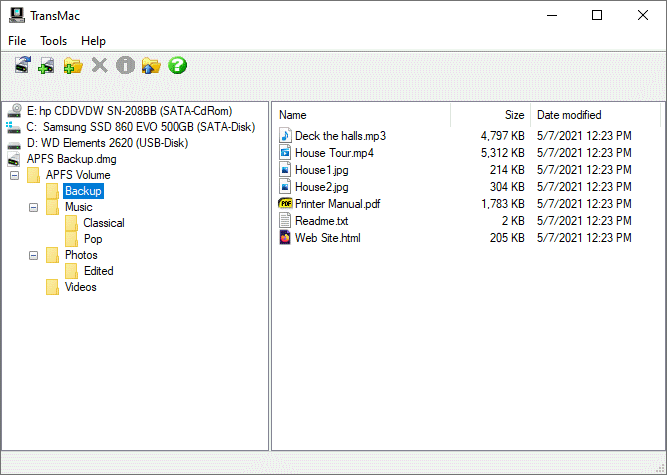
http://www.guarforum.net/gsmreport/s...66958-TransMac

Sunday, September 15, 2013
How To Convert dmg File to ipsw File
Apple has Released iOS 5 Beta 2 for Developers but iOS 5 beta2 direct links file were in .DMG format and many user having issues on how to extract and covert to the .IPSW from it.When you extract these files you’ll find get a couple .DMG files which needs to be combined into a .IPSW file before you can upgrade the iOS 5 beta 2.

How To Convert .dmg file to .ipsw file:
1. Download PowerISO – Download Link.
2. Import all the .dmg files and export it to a preferred location as .ipsw file.
3. Go to iTunes and do the regular upgrade process.
How To Convert .dmg file to .ipsw file:
1. Download PowerISO – Download Link.
2. Import all the .dmg files and export it to a preferred location as .ipsw file.
3. Go to iTunes and do the regular upgrade process.
Subscribe to:
Posts (Atom)