Showing posts with label by. Show all posts
Showing posts with label by. Show all posts
Monday, March 17, 2014
How to Find the Name or Title of a Song by Lyrics
Most people listen to songs from bands they like and sometimes search for the lyrics of a song if they can’t quite make out what’s being sung. However, for those of us who happen to listen to the lyrics of a song and want to find out who sang it, there are some useful lyric search engines that do just that. Frankly, this happen to me all the time!
Anyway, so if you know some of the lyrics for the song you’re looking for, you can try out a few of these lyric search engines to try and find the band or song name. Actually, there are quite a few of them out there, but only a few really have large databases of song lyrics. Here are some them websites :
1. Search Lyrics – This site also has some non-English lyrics and you can translate any of the English lyrics to another language on the lyric pages. Get Lyrical finds an exact match for your lyrics whereas Search Lyrics searches for those words anywhere in a particular song and will return a result even if the words are all not together.

3. LyricsFly – Make sure you click on Lyrics first and then perform a search.

The other web sites that I tried did not work good for song lyrics and so I’m not going to mention them here. If you know of any other lyric search engines, post a comment!
Anyway, so if you know some of the lyrics for the song you’re looking for, you can try out a few of these lyric search engines to try and find the band or song name. Actually, there are quite a few of them out there, but only a few really have large databases of song lyrics. Here are some them websites :
1. Search Lyrics – This site also has some non-English lyrics and you can translate any of the English lyrics to another language on the lyric pages. Get Lyrical finds an exact match for your lyrics whereas Search Lyrics searches for those words anywhere in a particular song and will return a result even if the words are all not together.
3. LyricsFly – Make sure you click on Lyrics first and then perform a search.
The other web sites that I tried did not work good for song lyrics and so I’m not going to mention them here. If you know of any other lyric search engines, post a comment!

Monday, October 7, 2013
Redsn0w 0 9 9b2 releases by Dev Team
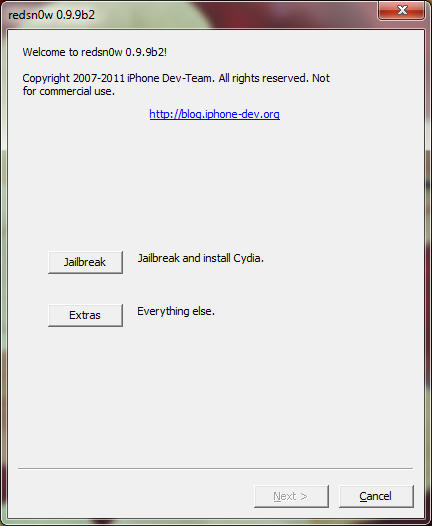
Redsn0w 0.9.9b2
Update #10: Version 0.9.9b2 has been released with fixes and enhancements related to: Verizon iPhone4 firmware detection, Fix Recovery, Stitching, and blob processing. If you encountered a problem with any of these in the b1 version, please try b2.
Here are the download links:

Tuesday, October 1, 2013
redsn0w 0 9 6rc13 Untethered iOS 4 3 2 Jailbreak Redsn0w by Dev Team
Only a few weeks after the 4.3.1 untether created by @i0n1c was released, Apple pushed out firmware 4.3.2. Thankfully, it appears Apple didn’t have a chance to fix the hole used by @i0n1c’s untether, so he ported his code over to 4.3.2’s kernel. Today’s redsn0w has been updated to include it.
The 4.3.2 untether works on all devices that actually support 4.3.2 except for the iPad2:
- iPhone3GS
- iPhone4 (GSM)
- iPod touch 3G
- iPod touch 4G
- iPad1
redsn0w 0.9.6rc13:
- Windows redsn0w
As always, ultrasn0w unlockers should stay away from redsn0w and only update their firmware through a custom IPSW. We’ll release a new version of PwnageTool sometime this week.
Note that many people are currently having problems updating to 4.3.2 through saurik’s server. You’ll need to remove the gs.apple.com entry in your hosts file in order to restore directly to Apple’s servers.

Saturday, September 28, 2013
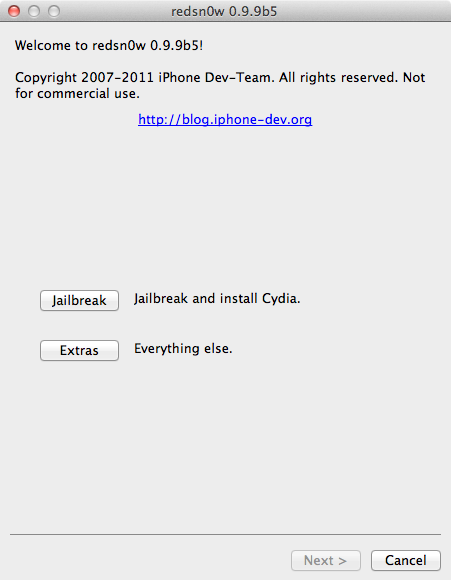
redsn0w 0 9 9b5 Released By Dev Team
The iPhone Dev-Team has released a tethered jailbreak for iOS 5. Currently only the Mac version has been made available; however, the Windows version is coming soon.
With todays official iOS5 release, redsn0w has been updated to 0.9.9b5 to include the public URLs for the IPSW files. This way, first-time iOS5 jailbreakers dont need to supply the IPSW file manually. Its still a tethered jailbreak on all except the old-bootrom iPhone3GS, and it doesnt apply to iPad2 or the upcoming iPhone4S.
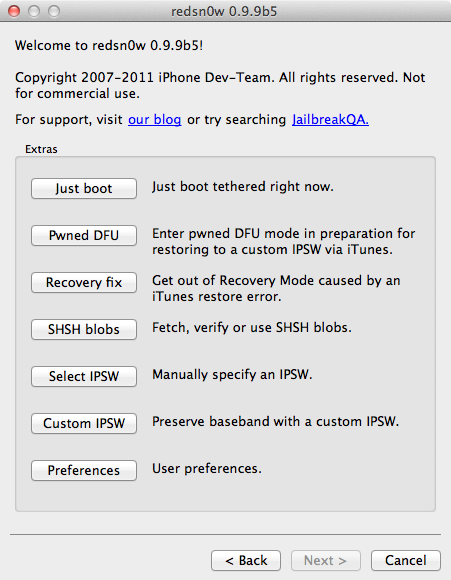
Because the jailbreak is currently only tethered for most devices, were not going to release a new PwnageTool yet. Instead, weve decided to build some of PwnageTools functionality into redsn0w (since you need redsn0w to "Just boot tethered" on every power cycle anyway). The new "Custom IPSW" button on the Extras screen will create a custom IPSW without the baseband update for 4.3.3 or 5.0gm (iPhone3GS and iPhone4 only, for now). Remember not to accidentally restore to the stock IPSW after you create the custom one! The custom one begins with NO_BB_ (for "no baseband").
You must enter "Pwned DFU" mode before trying to use the NO_BB_ IPSW with iTunes (and your hosts file cannot be pointing to Cydias servers due to the new blob nonce mechanism theyre using in iOS5).
Version 0.9.9b5 only available for Mac for now, until we can do more testing on the Windows version of "Custom IPSW".
Were currently working on a normal compatibility update for existing ultrasn0w unlockers. After that well try to fix the iBooks issue on jailbroken iOS5.
Here are the download links:
- redsn0w 0.9.9b5 for Mac
- redsn0w 0.9.9b4 for Windows (version 0.9.9b5 after more testing)
Tuesday, September 17, 2013
Unlock iPhone 4 iPhone 3GS On iOS 5 0 1 By Using Ultrasn0w Fixer
For those of you who want to unlock iPhone 4, iPhone 3GS on iOS 5.0.1 with Ultrasn0w Fixe. Well the Dev Team has just updated their Ultrasn0w Unlock tool to version 1.2.4 to support Apple Is iOS 5.0.1.

Today we will learn you how to unlock iPhone 4 or iPhone 3GS on iOS 5.0.1 with ultrasnow, sure you must jailbreak your iPhone first, just follow the simple tutorial posted here and come back to unlock iPhone 4 or iPhone 3GS running iOS 5.0.1.
Note: Supported Baseband “01.59.00 – 04.26.08 – 05.11.07 – 05.12.01 – 05.13.04 – 06.15.00″
1- Open Cydia from your iPhone 4 or iPhone 3GS.
2- Head to Manage => Sources => Edit => Add => this link “http://cydia.iloveidevice.tk” Or this one “http://cydia.myrepospace.com/smolk/”
3- Now back to the source and chose for your iDevice, Ultrasn0w Fixer for iPhone 4 or Ultrasn0w Fixer for iPhone 3GS.
Congrats, you are done, now just reboot your iPhone.
Unlock iPhone 4, iPhone 3GS
Today we will learn you how to unlock iPhone 4 or iPhone 3GS on iOS 5.0.1 with ultrasnow, sure you must jailbreak your iPhone first, just follow the simple tutorial posted here and come back to unlock iPhone 4 or iPhone 3GS running iOS 5.0.1.
Note: Supported Baseband “01.59.00 – 04.26.08 – 05.11.07 – 05.12.01 – 05.13.04 – 06.15.00″
1- Open Cydia from your iPhone 4 or iPhone 3GS.
2- Head to Manage => Sources => Edit => Add => this link “http://cydia.iloveidevice.tk” Or this one “http://cydia.myrepospace.com/smolk/”
3- Now back to the source and chose for your iDevice, Ultrasn0w Fixer for iPhone 4 or Ultrasn0w Fixer for iPhone 3GS.
Congrats, you are done, now just reboot your iPhone.
Safari 5 1 2 Is Now Released By Apple With Along Bug Fixes
Recently Apple releases safari 5.1.2 with more improvements and updates to fix bugs.From today you can say Good-bye for bugs and live in security while browsing at your iphone.


Apple has released Safari 5.1.2 to users this afternoon, available by direct download or by hitting up Software Update. The update is relatively minor, but brings along bug fixes that address issues of stability, extensive memory usage, fixing web pages that were flashing white, and now allows PDFs to be displayed within web content. Go ahead and download!The update is including fixes that :
- Improve stability
- Allow PDFs to be displayed within web content
- Address issues that could cause hangs and excessive memory usage
- Address issues that could cause web pages to flash white
Wednesday, September 11, 2013
iTunes 10 5 Releases by Apple
Apple today released iTunes 10.5, a new version of its media manager that adds a number of improvements and official support for devices running iOS 5. The next major version of Apple’s iOS is coming out this week on Wednesday, October 12th, and iTunes 10.5 will be required to sync devices that will be upgraded to the new software. iTunes 10.5 also enables iTunes Match, a new music service by Apple based on iCloud; iTunes Match, however, will publicly launch in the United States only at the end of October
iTunes 10.5 was originally seeded to developers in June, when Apple also released the first beta version of iOS 5. Since then, we noted iTunes 10.5 included some minor graphical updates to the interface; this summer Apple also rewrote iTunes’ codebase to take advantage of Lion with full 64-bit support, and this new version of the app includes the changes we originally reported here. iTunes 10.5 also adds support for iCloud, Apple’s new cloud service that allows users to store digital purchases in the cloud, and re-download them at any time on any device. This functionality was previously activated as “beta” and called iTunes in the Cloud; as Apple notes, “iTunes in the Cloud is now part of iCloud”, but that doesn’t change the way songs have been able to be pushed across devices since last June. iCloud will also be officially launched on October 12th alongside iOS 5.
As we detailed in June with the release of “iTunes in the Cloud” as beta for iOS 4.3 and iTunes 10.3, iCloud support in iTunes allows users to re-download all previously purchased songs, TV shows, apps and books at no additional charge. In the new Purchased section of iTunes, users will find a link to browse previous downloads and re-download them at any time. Another option to automatically fetch all new downloads from any device and save them on a Mac or PC — called Automatic Downloads — is also enabled with iCloud on iTunes 10.5.
The ‘Purchased’ screen is a really handy feature to easily and quickly find a previous purchase and instantly download it or even download all of your previous purchases with just one click. The feature, which is also included in iOS 5, is part of Apple’s iCloud, which was unveiled at yesterday’s WWDC keynote. The ‘Purchased’ screen also gives you some fairly powerful tools to find the exact purchase you want, either from just searching, only displaying items not downloaded to your iTunes library or just list the purchases alphabetically.
Download iTunes v10.5:
Windows x32
Windows x64
Mac

Monday, September 9, 2013
iPhone 4S Jailbreak Done by iPhone Dev Team Release Imminent ScreenShot
Good News! iPhone Dev-team has successfully jailbroke iPhone 4S as MuscleNerd just tweeted about the very preliminary iPhone 4S jailbreak on his Twitter account. He also posted two pictures that shows Cydia running on iPhone 4S on iOS 5.

Along with this good news, there is a bad news too. It is clear from the statement of MuscleNerd that there is still a lot of work left in the jailbreak for 4S that is preventing public release. But it is confirmed that the release of iPhone 4S jailbreak is imminent. Also jailbreaking iPhone 4S on iOS 5 means we have iPad 2 jailbreak as well because both iPad 2 and iPhone 4S has the same bootrom. But for all this, you have to wait as you did for iPad 2 jailbreak on 4.3.3.
Please dont fall for the scammers that tell you we can bring untethered jailbreak on iOS 5 . They all are scammers. Please stay away from them. When untethered jailbreak for iOS 5, iPhone 4S and iPad 2 becomes official, we will let you know.
VERY preliminary 4S JB:http://twitpic.com/76vcp4 http://twitpic.com/76vct2 (Huge missing pieces prevent public release. LOTS of work left)

Along with this good news, there is a bad news too. It is clear from the statement of MuscleNerd that there is still a lot of work left in the jailbreak for 4S that is preventing public release. But it is confirmed that the release of iPhone 4S jailbreak is imminent. Also jailbreaking iPhone 4S on iOS 5 means we have iPad 2 jailbreak as well because both iPad 2 and iPhone 4S has the same bootrom. But for all this, you have to wait as you did for iPad 2 jailbreak on 4.3.3.
Please dont fall for the scammers that tell you we can bring untethered jailbreak on iOS 5 . They all are scammers. Please stay away from them. When untethered jailbreak for iOS 5, iPhone 4S and iPad 2 becomes official, we will let you know.
Subscribe to:
Posts (Atom)