Showing posts with label gsm. Show all posts
Showing posts with label gsm. Show all posts
Thursday, September 26, 2013
Gsmhosting aka GSM FORUM home of the cheaters
These are the cheaters that live and manage gsmhosting aka GSM FUKRUM.
So no ppl is safe. If they do not fix their problems they are the problem.
Administrators
AboAli
Winner58
zfrank
Winner58
zfrank
Moderators User Name / Location ..::ArchitRaj::.. Rishikesh, Uttaranchal .:: parash:::. B a n g l a d e s h .::Rizwan::. .:: 36MY1EF ::. .:SUBRATA:. BanglaDesH ::.::RAMJAN::.:: TRUST-GSM™ Bangladesh BB-gsm GEORGIA,Tbilisi BLIDA BuMobiles UK Chris02 Germany crux dagos Romania Dave.W England essojay GSM MIND P A K I S T A N malikkk HEART BEATS Raheeeeb -------- ReviveR Novi Sad, Serbia spider-man ALGERIA, Tlemcen, Tounane stanner_austin ISDES is best in side algo. Syed Hong Kong. taoufik.om Morocco tkowsar Bangladesh Unknown® <<<TuRKeY>>> Willmaster Austria-Vienna yousha Twitter.com/y0ush4 zlix Serbia Vrbas
Super Moderators User Name / Location ..:: Neo::.. E G Y P T acyl2000 Malaysia DrMobile P A K I S T A N _________ ___Wahab_ul_Haq___ ¯¯ Drug_Store Portugal Gsm Lab Pakistan , Dubai GsmProf Germany Mobile Lab D U B A I Pandemonio100 ITALY simonng83 Malaysia Penang [MoOkIe] Leiria, PT & Macao, CN

Wednesday, September 18, 2013
Rocky Racoon 5 1 1 Untether updated with support for iPhone 4 GSM 5 1 1 9B208 build
The Rocky Racoon 5.1.1 Untether was just updated to version 1.0-2, and is now available for download in Cydia. This is the package that is installed on iOS devices that utilize the 5.1.1 untethered jailbreak, whether you obtained it via Absinthe, or via the Rocky Racoon installation on a 5.1.1 tethered jailbreak.
This update brings support to the iPhone 4 (GSM) 5.1.1/9B208 build that was recently released by Apple.
All that this means is that you can now gain untethered status using the latest version of Rocky Racoon. If your iPhone 4 is running this firmware build, and it is currently jailbroken using a tethered jailbreak, you can install Rocky Racoon to gain untethered status.
The Chronic Dev Team, as expected, has released an update to the Absinthe jailbreak tool to enable iPad 2,4 untethered jailbreak support for iOS 5.1.1.
The iPad 2,4 is the updated version of the iPad 2 that features a new chipset yielding improved battery life. Due to the rarity of this version of the iPad 2, support was withheld until further testing could be done. Now it’s obvious that the testing was completed successfully…
The Rocky Racoon 5.1.1 Untether has also been updated to version 1.0-3 as a result of the added support for the iPad 2,4.
Head over to our downloads page to download Absinthe 2.0.4. Do you have an iPad 2,4? If so, let us know how the jailbreak experience goes once you use he latest version of Absinthe.

Sunday, September 8, 2013
Upgrade to 4 3 2 all iPhones and iPods GSM CDMA
Apple has just released iOS 4.3.2 to iPhone 4, iPhone 3GS, iPod touch 4G, iPod touch 3G, iPad 1 and iPad 2. You can follow the below step by step guide to update your iOS device to the newly iOS 4.3.2.
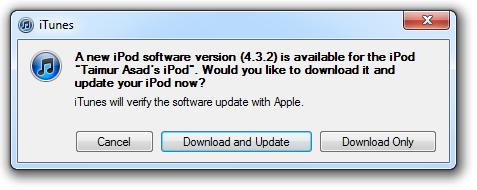
Steps to Upgrade your iDevice to iOS 4.3.2
:
Step 1: Download your Firmware from the Links at the end of the post.
Step 2: Download and install iTunes 10.2.1 from Here.
Step 3: Connect your Device and Launch iTunes
Step 4: Right Click on the iPhone Icon on the left in iTunes and choose "Backup" (backup process will take place)
Step 5: After Backup your Data, Hold down Shift (Windows) / Alt (Mac) and click on Restore.
Step 6: Choose your iOS 4.3.2 firmware you already downloaded!
Now Let the iTunes do some processes then your Device will be updated as soon as iTunes finish its upgrade process.
Direct Download Links for iOS 4.3.2 / 4.2.7
Read More..
Steps to Upgrade your iDevice to iOS 4.3.2
:
Step 1: Download your Firmware from the Links at the end of the post.
Step 2: Download and install iTunes 10.2.1 from Here.
Step 3: Connect your Device and Launch iTunes
Step 4: Right Click on the iPhone Icon on the left in iTunes and choose "Backup" (backup process will take place)
Step 5: After Backup your Data, Hold down Shift (Windows) / Alt (Mac) and click on Restore.
Step 6: Choose your iOS 4.3.2 firmware you already downloaded!
Now Let the iTunes do some processes then your Device will be updated as soon as iTunes finish its upgrade process.
Direct Download Links for iOS 4.3.2 / 4.2.7
Subscribe to:
Posts (Atom)