Showing posts with label increase. Show all posts
Showing posts with label increase. Show all posts
Sunday, March 23, 2014
How to increase internet speed
Friends this is very tough to work on computer having very low speed. You want to increase your internet connection speed. There are many tweaks to boost and increase internet speed. Some of these are here which has been tested by myself and i found these tricks very useful increasing my internet speed.
TRICK 1 :
TRICK 2 :
TRICK 1 :
- Click START and then RUN, or press WIN + R
- type gpedit.msc and press Enter.
- expand "Local Computer Policy"
- then expand "Administrative Templates"
- then expand "Network Branch"
- Click on "QoS Packet Scheduler"
- on right side of window Double click "Limit reservable bandwidth"
- a different window will pop up, set Enabled and change Bandwidth limit (%) to 0.
- Click OK and Restart your computer.
TRICK 2 :
- Download SG TCP Optimizer , dont need to install , just double click and it runs. the window looking like below
 | ||
- Under the General Setting tab, just drag the slider to match your connections download speed. and then at the bottom of window select Optimal Settings button and click Apply changes.
- you will now be looking a window like below
 |
- Make sure the Backup box must be ticked, and then click OK.
- Restart your system and experiance the increasing internet connection speed.
TRICK 3 :
Sometimes your internet connection works too low due to virus and hard drives junk files or errors.
So for best results use any Good Antivirus to remove virus if found, Remove all the hard drives junk files or errors by using freeware open source softwares like C Cleaner (free), Registry booster and speed up PC (paid) etc.
enjoy and comment.....
So for best results use any Good Antivirus to remove virus if found, Remove all the hard drives junk files or errors by using freeware open source softwares like C Cleaner (free), Registry booster and speed up PC (paid) etc.
enjoy and comment.....

Friday, March 21, 2014
How To Increase Internet Speed Of Mozilla Firefox Browser
Mozilla Firefox being a favorite browser for any internet users, there are a few tricks that you can do to speed up your mozilla firefox browser to make it connect to the internet much faster than the normal speed.
The tricks i am posting can be done by any person who is new to technology and computers. This small and simple tricks can make your browser faster than ever and make your downloads quicker thus saving much of your time. Firefox is speed browser,good to uploading and downloading,But this tips helps to increase the speed. Follow these given steps carefully
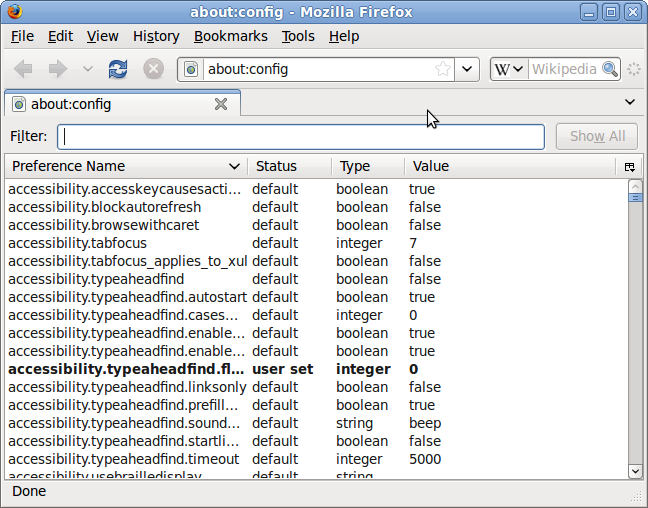
1. Type about:config in your mozilla firefox browser.
2. A warning window will popup, Press Ill be careful, I promise! button.
3. Type network in search
4. A list of preference will appear, double click on network.buffer.cache.size and increase its value (you
can increase the value more than the supposed limit, the computer will simply limit it to the maximum that it is being programmed for).
5. Scroll down to find network.http.max-connections and increase the values of all the connections.
6. Click on network.http.pipelining and Set pipelining to true.
7. Double Click on network.http.pipelining.maxrequests and Increase the value of pipelining max-requests.
Youve done it, now close your browser and restart it to find a new browser working faster than before. The speed increase is not much visible if you are using faster networks. But if you are two people using the same Wi-Fi connection you will definitely observe the difference.
Tag: how to speed up internet, how to speed up mozilla firefox, how to increase speed of mozilla firefox, Speed up your browser
 |
1. Type about:config in your mozilla firefox browser.
2. A warning window will popup, Press Ill be careful, I promise! button.
3. Type network in search
4. A list of preference will appear, double click on network.buffer.cache.size and increase its value (you
can increase the value more than the supposed limit, the computer will simply limit it to the maximum that it is being programmed for).
5. Scroll down to find network.http.max-connections and increase the values of all the connections.
6. Click on network.http.pipelining and Set pipelining to true.
7. Double Click on network.http.pipelining.maxrequests and Increase the value of pipelining max-requests.
Youve done it, now close your browser and restart it to find a new browser working faster than before. The speed increase is not much visible if you are using faster networks. But if you are two people using the same Wi-Fi connection you will definitely observe the difference.
Tag: how to speed up internet, how to speed up mozilla firefox, how to increase speed of mozilla firefox, Speed up your browser
Subscribe to:
Posts (Atom)