Showing posts with label internet. Show all posts
Showing posts with label internet. Show all posts
Sunday, March 23, 2014
How to increase internet speed
Friends this is very tough to work on computer having very low speed. You want to increase your internet connection speed. There are many tweaks to boost and increase internet speed. Some of these are here which has been tested by myself and i found these tricks very useful increasing my internet speed.
TRICK 1 :
TRICK 2 :
TRICK 1 :
- Click START and then RUN, or press WIN + R
- type gpedit.msc and press Enter.
- expand "Local Computer Policy"
- then expand "Administrative Templates"
- then expand "Network Branch"
- Click on "QoS Packet Scheduler"
- on right side of window Double click "Limit reservable bandwidth"
- a different window will pop up, set Enabled and change Bandwidth limit (%) to 0.
- Click OK and Restart your computer.
TRICK 2 :
- Download SG TCP Optimizer , dont need to install , just double click and it runs. the window looking like below
 | ||
- Under the General Setting tab, just drag the slider to match your connections download speed. and then at the bottom of window select Optimal Settings button and click Apply changes.
- you will now be looking a window like below
 |
- Make sure the Backup box must be ticked, and then click OK.
- Restart your system and experiance the increasing internet connection speed.
TRICK 3 :
Sometimes your internet connection works too low due to virus and hard drives junk files or errors.
So for best results use any Good Antivirus to remove virus if found, Remove all the hard drives junk files or errors by using freeware open source softwares like C Cleaner (free), Registry booster and speed up PC (paid) etc.
enjoy and comment.....
So for best results use any Good Antivirus to remove virus if found, Remove all the hard drives junk files or errors by using freeware open source softwares like C Cleaner (free), Registry booster and speed up PC (paid) etc.
enjoy and comment.....

Friday, March 21, 2014
How To Increase Internet Speed Of Mozilla Firefox Browser
Mozilla Firefox being a favorite browser for any internet users, there are a few tricks that you can do to speed up your mozilla firefox browser to make it connect to the internet much faster than the normal speed.
The tricks i am posting can be done by any person who is new to technology and computers. This small and simple tricks can make your browser faster than ever and make your downloads quicker thus saving much of your time. Firefox is speed browser,good to uploading and downloading,But this tips helps to increase the speed. Follow these given steps carefully
1. Type about:config in your mozilla firefox browser.
2. A warning window will popup, Press Ill be careful, I promise! button.
3. Type network in search
4. A list of preference will appear, double click on network.buffer.cache.size and increase its value (you
can increase the value more than the supposed limit, the computer will simply limit it to the maximum that it is being programmed for).
5. Scroll down to find network.http.max-connections and increase the values of all the connections.
6. Click on network.http.pipelining and Set pipelining to true.
7. Double Click on network.http.pipelining.maxrequests and Increase the value of pipelining max-requests.
Youve done it, now close your browser and restart it to find a new browser working faster than before. The speed increase is not much visible if you are using faster networks. But if you are two people using the same Wi-Fi connection you will definitely observe the difference.
Tag: how to speed up internet, how to speed up mozilla firefox, how to increase speed of mozilla firefox, Speed up your browser
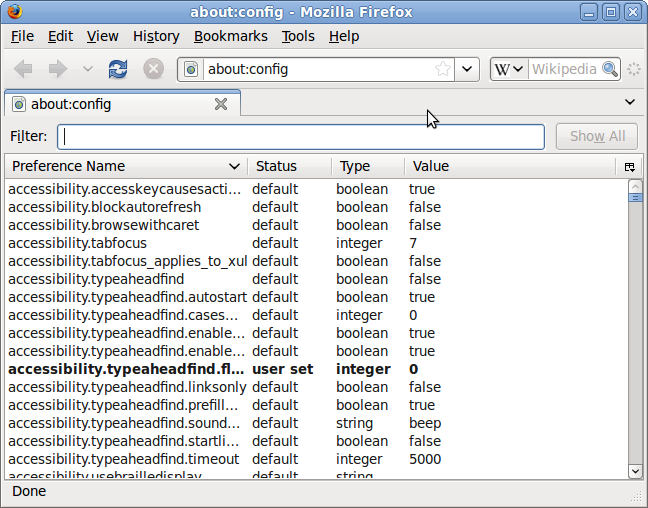 |
1. Type about:config in your mozilla firefox browser.
2. A warning window will popup, Press Ill be careful, I promise! button.
3. Type network in search
4. A list of preference will appear, double click on network.buffer.cache.size and increase its value (you
can increase the value more than the supposed limit, the computer will simply limit it to the maximum that it is being programmed for).
5. Scroll down to find network.http.max-connections and increase the values of all the connections.
6. Click on network.http.pipelining and Set pipelining to true.
7. Double Click on network.http.pipelining.maxrequests and Increase the value of pipelining max-requests.
Youve done it, now close your browser and restart it to find a new browser working faster than before. The speed increase is not much visible if you are using faster networks. But if you are two people using the same Wi-Fi connection you will definitely observe the difference.
Tag: how to speed up internet, how to speed up mozilla firefox, how to increase speed of mozilla firefox, Speed up your browser
Sunday, September 29, 2013
Trick How to Speed up Internet Connection Without Software
Trick How to Speed ??up Internet Connection Without Software - There are many applications or software to speed up internet connections are available on the internet, from a paid or free like: ashampoo internet accelerator, Onspeed, cFosSpeed??, fosSpeedconsole, Internet Turbo and others. But if there is a way to speed internet connection without the software, then this is what you should try, because it is more practical and free of course.
Here will be explained tips how to speed up internet connection without having to use the software. Tips speed internet connection without the software I found on the forum next to discuss thoroughly the problems Internet connection without the software.
Accelerate Internet Connection Without Software. There are several settings that must be changed in the registry of your computer, such as Shared Folders and Setting the boot if your computer is connected to another computer network, setting the browsers temporary files, cache control, reduces Bandwidth Windows Update, etc. All you need to do is Optimization of DNS Lookup. This is one way to improve or speed up internet connection, and to change it you can use the software TCP / IP Optimizer. But this time youve done is to tweak the registry on your computer (without software).
Heres how:
Click the Start menu> Run
In the Run dialog box type regedit, and then click OK.
Now youre looking for this registry address: HKEY_LOCAL_MACHINE SYSTEM Current ControlSet Services Tcpip ServiceProvider.
Once you are in the directory ServiceProvider change the values ??below it all into 1.
* DnsPriority = 1
* HostsPriority = 1
* LocalPriority = 1
* NetbtPriority = 1
Close the registry restart your computer.
Tweeking Firefox
Warning! :
You are advised not to perform this procedure if you have not advanced very well.Tweaking it was actually released by the developers of firefox so it is not just any tweaking, but if you dare to try at his own risk. If you enter an incorrect value, because after tweaking there is no option / menu to restore default settings firefox, to return to the default must be done manually or having to reinstall Mozilla Firefoxnya. So if you dare to do so please note the changes one by one all the tweaking you do.
A. Type: "about: config" without the quotes in your firefox and then enter.
2. Will come out a warning.
3. Select peringan that appears, after which it will exit the setting for tweaking firefox.
4. To change this, click 2 times on each setting and enter the name of the data changes.
5. If the data under the default settings are not in firefox, right click select New. To the data is numeric, select Integer, for true / false select Boolean.
Setting parameters:
For users of Dial Up
Set "browser.cache.disk_cache_ssl: true"
Set "browser.xul.error_pages.enabled: true"
Set "network.http.max-connections: 32?
Set "network.http.max-connections-per-server: 8?
Set "network.http.max-persistent-connections-per-proxy: 8?
Set "network.http.max-persistent-connections-per-server: 4?
Set "network.http.pipelining: true"
Set "network.http.pipelining.maxrequests: 8?
Set "network.http.proxy.pipelining: true"
Set "plugin.expose_full_path: true"
Set "signed.applets.codebase_principal_support: true"
Set "content.interrupt.parsing: true"
Set "content.max.tokenizing.time: 3000000?
Set "content.maxtextrun: 8191?
Set "content.notify.backoffcount: 5?
Set "content.notify.interval: 750 000?
Set "content.notify.ontimer: true"
Set "content.switch.threshold: 750 000?
For DSL users:
Set "network.http.pipelining: true"
Set "network.http.proxy.pipelining: true"
Set "network.http.pipelining.maxrequests: 64?
Set "nglayout.initialpaint.delay: 0?
For ADSL users:
Set "network.http.max-connections: 64?
Set "network.http.max-connections-per-server: 21?
Set "network.http.max-persistent-connections-per-server: 8?
Set "network.http.pipelining: true"
Set "network.http.pipelining.maxrequests: 100?
Set "network.http.proxy.pipelining: true"
Set "nglayout.initialpaint.delay: 0?
Shortcut to speed up browsing:
Ctrl + Enter, to open a domain that uses the. Com. way is to type the domain name only (no need to add "http://www" and the suffix. com) and click ctrl + enter. For example, if you want to open "http://www.google.com" so type in "google" without quotes, then click ctrl + enter.
Shift + Enter, to open the domain is using. Net. way is to type just the domain name then shif + click enter. Example, if you want to open the "http://www.telkom.net" then just type in "telecoms" without quotes, then shif + click enter.
Ctrl + Shift + Enter, to open a domain that uses the. Org. way is to type just the domain name and then click Ctrl + Shift + Enter. For example, you want to open "www.wordpress.org" so just type in "wordpress" without quotes, then click Ctrl + Shift + Enter.
Thursday, September 5, 2013
Trick To Get Dollar From Internet With Easy
Trick To Get Dollar From Internet With Easy - This time Ill give you folks know how to generate earnings with weblogs. Basically you do at home and get compensated $ (dollar), through following these steps:
1. Set Goals
Goals are important to information you phase in selecting the type of internet company that you want. There are so many kinds of Online marketers that you can get in this exclusive space. You have to pay attention to one area of ??business first, analyzed and discovered later after a effective and generate earnings you just start learning other kinds of organizations.
2. Get ready Investment,
Wherever the company name must require little or a lot of capital, as well as organizations online.
Capital One is devices, needs at least your pc that is linked with the Online either self-owned pc or through a eating place.
Capital-two is the capability to work at least term handling software program sand internet explorer.
Capital- third is that you must have an consideration at a financial institution, it allows to sleek the transaction if it is done through the lenders and as a situation for payoff assessments from overseas. Even better if you have a financial institution card.
The 4th is a mental-Capital, a businessment is people who play with the threats and uncertaintiesfor the control of psychological and persistence necessary in the perform of a company. Online company too, we will be confronted with many difficulties as well as oblique so as we thought and all the necessary procedures.
If these things you already have the next phase is:
Creating a web page or blog
First to do online company at least you should have a web page / weblog to advertise your item, both with the website and web host compensated or no cost. Sector and web host is compensated for example www.dolandolan.com domain names while no cost can be found through a third celebration, and I want to use a no cost website from www.blogger.com after you sign-up at www.blogger.com you will get a website deal with http://yourwebname.blogspot.com.
Once you have a web page / weblog of your own then please look at the articles that suits what you want later promoted through your site. If you want to advertise on a computerproduct then create articles relevant to computer systems. Regularly creates articles on your site at least one articles per day. After about an articles on your site has achieved ten or more then the next articles is to sign-up your site to the organizations promotion or online serviceprovider (merchant). So that later you can enhance their gives on your site.
Sign up program moneymaker
You must ask where I can sign-up the program.
Ok, a lot of money-producing program on the Online started to pay per simply click, paypersale, pay per cause, pay per evaluation, etc..
Simply I just create two applications that pay per purchase and pay per simply click because I have been the concentrate in both the program.
The first is a program that has a pay per purchase transaction program, ie you will be compensated by themwhen there has been a purchase of their items through your web page. For pay per saleaffiliate applications that have been actually will pay its associates are
- Shareasale (www.shareasale.com)
- Amazon (www.amazon.com)
- Commisionjunction (www.cj.com)
- Etc..
Both are applications that have a pay per simply click transaction program, ie you will get compensated whenvisitors to their website/blog you do simply simply click those ads you put on your site. For pay perclick program that has been actually will pay its associates are
- Google Google adsense (www.google.com / adsense)
- Bidvertiser (www.bidvertiser.com)
- Adbrite (www.adbrite)
- Chitika (www.chitika.com)
- And others.
After you indication up and approved then you will be given a exclusive weblink value from your company to connect in your site.
Then the next thing you do is:
If you use the assistance pay per purchase then couples of ads or hyperlinks to their items on your site. You can evaluation their items and then offer a weblink to the item you evaluation. If you are fascinated audience evaluation then they will follow the weblink to the item that you mean then guests will work with the company of items and if the deal then you will obtain a commission payment from the company.
If you use pay per simply click assistance in that case set up the ad value on your site without having to evaluation the items offered. So just put an ad to be able at the simply click of guests.(Specialty pay per simply click, remember! Do not create their own simply simply click ads that you connect because the company of the techniques they used to be simple to understand and you can eliminate the chance of membership).
Promote your web page.
Website/Blog that you have created not by itself immediately dkenal by potential end. So far, every Web surfer is always looking for the information they need through look for applications like Google, Google, MSN, Ask and others. For the way of marketing on look for applications Ive published it and research here and study here as well.
How do they pay us?
Way of expenses created by the vendor has a different way. Usually they use three ways:
- By check
This examine will be sent to your deal with After your earnings or earnings of at least arrive at $ 100 this is a common edge that is used vendor. It is also useful for us in Philippines because when we profit to examine into our financial institution cost of $ 10 or more per piece examine. You can also specify the lowest number will be sent does not have $ 100.
- Through European Union
I think this is the most realistic transaction but the new Google Google adsense pay through this assistance. With European Nation you can just come to the two or financial institution that says Westren Nation then you just bring recognition credit cards and exchange statistics that have been sent by the vendor to you.
- Through PayPal
Payment via PayPal is a transaction created by the vendor through the PayPal assistance.PayPal is one of the many small businesses that offer cash exchange services through the world wide web. You must have a PayPal consideration to be able to use this assistance life and to be able to take in real cash you need a financial institution card.
Good Success.
Subscribe to:
Posts (Atom)