Showing posts with label automatic. Show all posts
Showing posts with label automatic. Show all posts
Saturday, October 12, 2013
iPhone How to Enable iCloud Automatic Downloads in iOS
These are instructions on how to enable iCloud Automatic Downloads for Apps, iTunes, and iBooks in iOS. You need an iTunes account to enable this new feature.
These are instructions on how to enable iCloud Automatic Downloads for Apps, iTunes, and iBooks in iOS. You need an iTunes account to enable this new feature.
Step OnePress to launch Settings from your Springboard.

Step TwoPress to select Store from the Settings Menu.


Step FourTo enable Automatic Downloads for Apps, iTunes, or iBooks turn the respective switch to the ON position.
To enable Automatic Downloads while you are on the cellular network turn the Cellular switch to the ON position.


Now when you purchase or download a new app, song, or book the item will automatically be pushed to all your devices.
Read More..
These are instructions on how to enable iCloud Automatic Downloads for Apps, iTunes, and iBooks in iOS. You need an iTunes account to enable this new feature.
Step OnePress to launch Settings from your Springboard.

Step TwoPress to select Store from the Settings Menu.
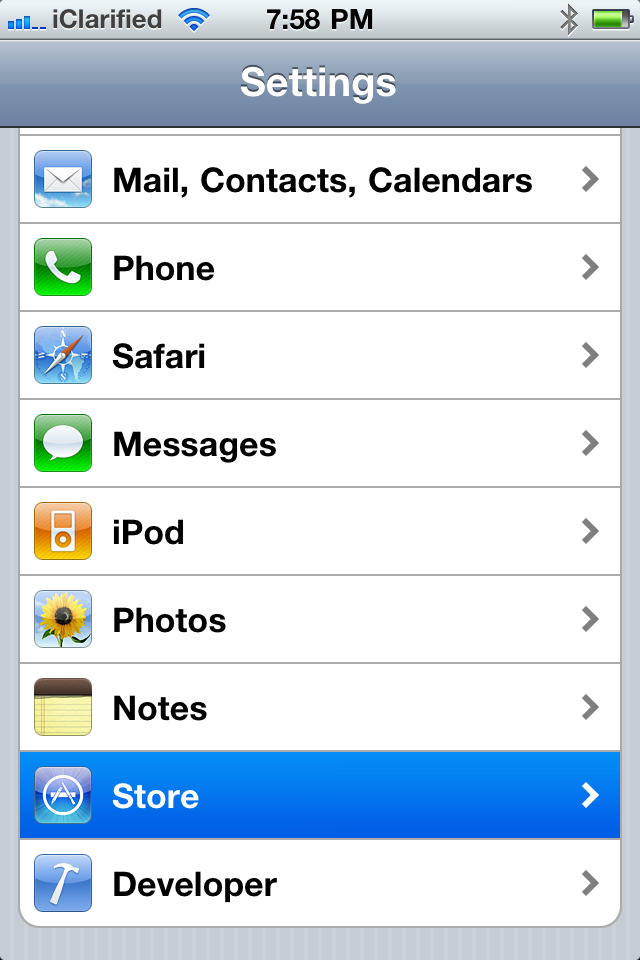
Step ThreePress the Sign In button if you are not already Signed In.

Step FourTo enable Automatic Downloads for Apps, iTunes, or iBooks turn the respective switch to the ON position.
To enable Automatic Downloads while you are on the cellular network turn the Cellular switch to the ON position.


Now when you purchase or download a new app, song, or book the item will automatically be pushed to all your devices.

Wednesday, September 4, 2013
Dropbox photo Upload for Android Automatic
Dropbox photo Upload for Android Automatic - Dropbox now has attractive offers to the owners of the Android. Co-founder and CEO Drew Houston said that this is part of the mission Dropbox to be an application that can solve all the "hidden problem" of all people in the use of technology, with features of Desktop and Android are able to upload one photo to the Dropbox account automatically.

In fact this way is very simple - all you need to do is shoot a few pictures using your smartphone, and without the need to use cable, synchronized directly to your computer ina few minutes, you need to make sure is enough bandwidth.
While many people may argue that iCloud + and Google have done it, which isinteresting to note that the majority of Mac users are not Dropbox users, while Google +is still in its infancy. Not only that, Dropbox automatically synchronize full-sized image,while Google + downscales do so by downloading the pictures 2048px.
With this application users can wirelessly to upload high resolution photos directly viamobile phone to the cloud storage android dropbox. All files that have been diuplaod to dropbox is as usual you can also access via a desktop computer or other mobile devices, simply by logging into your dropbox account.
Currently dropbox indicate if the application while only available for Android phones, but Dropbox promised to release a version for IOS.
Subscribe to:
Posts (Atom)