Showing posts with label in. Show all posts
Showing posts with label in. Show all posts
Tuesday, March 4, 2014
Central University in India for M Tech Admissions 2013 through Gate or non Gate
What should be your choice of college or university for M.Tech admission 2013 after than IITs and NITs of India?
This question arise in a student mind who is having low score in GATE or does not qualify in GATE examination 2013. You dont need to tense if you are having low score or no score in GATE, because there are few good universities in India who conducts their own written examination for the admission in M.Tech / M.E (Masters of Engineering programme). Also they give you a chance to admit through GATE score if you are having low GATE score.
These central university give you a good alternative to IITs and NITs for Master of Engineering programme, because they have good faculty and research atmosphere as well as good placements.
Here in this post i am sharing a list of some best central universities in india for M.Tech admissions 2013 along with their fees and closing date of application.
Aligarh Muslim University - fees Rs.300, closing date 06-04-2013
University of Delhi - closing date in june of 2013
University of Hyderabad - fees Rs.350, closing date 24-01-2013
Dr. Harisingh Gour Vishwavidyalaya - fees Rs.600, closing date 05-04-2013
Jamia Millia Islamia - fees Rs.550, closing date 07-05-2013
JLN University - fees Rs.220, closing date 23-03-2013
Pondicherry University - fees Rs.100, closing date 15-04-2013
Tezpur University - fees Rs.560, closing date 08-04-2013
If you have some other information related to central university M.Tech admission 2013 notification, please share comments. It may be helpful to other students to apply for admission.
also visit good university other than IITs and NITs through gate 2013
Tags: central university for M.Tech admission 2013, Notification for central university M.Tech admission 2013, fees to apply in central university for M.Tech admission 2013
This question arise in a student mind who is having low score in GATE or does not qualify in GATE examination 2013. You dont need to tense if you are having low score or no score in GATE, because there are few good universities in India who conducts their own written examination for the admission in M.Tech / M.E (Masters of Engineering programme). Also they give you a chance to admit through GATE score if you are having low GATE score.
These central university give you a good alternative to IITs and NITs for Master of Engineering programme, because they have good faculty and research atmosphere as well as good placements.
Here in this post i am sharing a list of some best central universities in india for M.Tech admissions 2013 along with their fees and closing date of application.
Aligarh Muslim University - fees Rs.300, closing date 06-04-2013
University of Delhi - closing date in june of 2013
University of Hyderabad - fees Rs.350, closing date 24-01-2013
Dr. Harisingh Gour Vishwavidyalaya - fees Rs.600, closing date 05-04-2013
Jamia Millia Islamia - fees Rs.550, closing date 07-05-2013
JLN University - fees Rs.220, closing date 23-03-2013
Pondicherry University - fees Rs.100, closing date 15-04-2013
Tezpur University - fees Rs.560, closing date 08-04-2013
If you have some other information related to central university M.Tech admission 2013 notification, please share comments. It may be helpful to other students to apply for admission.
also visit good university other than IITs and NITs through gate 2013
Tags: central university for M.Tech admission 2013, Notification for central university M.Tech admission 2013, fees to apply in central university for M.Tech admission 2013

Sunday, March 2, 2014
What is drive testing in Telecom Procedure of drive testing
Drive Test is conducted for checking coverage criteria of a cell site with RF drive test tool. The data collected by drive test tool as Log files is analyzed to evaluate various RF parameters of the network.
This way mobile phone companies can decide how to improve their network coverage in a certain geographical area.
Normally it is conducted in a car, with one driver and one or two drive testing engineers checking the data and navigating the driver to the right direction if necessary. These drive testing engineers first reach to the tower location and make physical optimization by inspecting issues like cable swapping, improper hardware, alarms, antenna tilting (machenical and electrical), antenna orientation.After field or physical optimization he starts drive testing by his vehicle. Drive testing engineer collects network data by making a lot of calls (short and long). The data collected includes data for serving cell as well as the neighbours.This data collected helps us to find and analyze the problems in the network.
Drive Test performance measurements are carried out for the following reasons:
Here i am suggesting some precautions for beginners in drive testing -
Tags: how to drive test in telecom, software used in telecom RF drive testing, tools used in drive testing, kit of drive testing, procedure of drive testing, RF drive testing, TEMS software in drive testing, steps of drive testing, what is the network data collected in RF drive testing
- Drive Route and Site Data for the sites to be driven is taken from customer
- Drive Test LOG File of the specified Drive Route / Site is saved and the same will be handed over to customer at the end of the day
- Drive Test Resource identify routine field optimization issues like cable swapping, missing neighbors etc., and rectify the same with the help of the customer.
This way mobile phone companies can decide how to improve their network coverage in a certain geographical area.
 |
Normally it is conducted in a car, with one driver and one or two drive testing engineers checking the data and navigating the driver to the right direction if necessary. These drive testing engineers first reach to the tower location and make physical optimization by inspecting issues like cable swapping, improper hardware, alarms, antenna tilting (machenical and electrical), antenna orientation.After field or physical optimization he starts drive testing by his vehicle. Drive testing engineer collects network data by making a lot of calls (short and long). The data collected includes data for serving cell as well as the neighbours.This data collected helps us to find and analyze the problems in the network.
Drive Test performance measurements are carried out for the following reasons:
- Test the network from the subscribers point of view
- Test the complete system, end to end
- Benchmark performance against competitor networks
- Test specific important routes and areas
- Test in-building coverage for specific buildings(Metro, Airport, office etc.) called walk test.
- Vehicle
- Drive test mobile phone (e.g Ericsson TEMS)
- Dongle (network inspection USB)
- External vehicle mounted GPS
- Laptop with drive test software and GPS connection capability and data cables, multi-connector port etc.
- TEMS Investigation
- Agilent E6474A
- Neptune
- CDMA Air Interface Tester (CAIT)
- TEMS DeskCat
- Actix Analyze
Here i am suggesting some precautions for beginners in drive testing -
- Before starting your drive test, Collect all your equipment like GPS, Dongle, Data cables, laptop etc. You should check your kit properly working and properly setup. Also check site data, mapinfo etc. should be installed on your system.
- Make sure all USBs are properly attached and must not be loose, otherwise it will create problem while drive testing
- At physical optimization time, you should have proper safety measures.
- First analyze the problem, then start driving to optimize the network problem.
- Dont forget to play and save logfile before starting drive testing.
Tags: how to drive test in telecom, software used in telecom RF drive testing, tools used in drive testing, kit of drive testing, procedure of drive testing, RF drive testing, TEMS software in drive testing, steps of drive testing, what is the network data collected in RF drive testing
Saturday, October 12, 2013
iPhone How to Enable iCloud Automatic Downloads in iOS
These are instructions on how to enable iCloud Automatic Downloads for Apps, iTunes, and iBooks in iOS. You need an iTunes account to enable this new feature.
These are instructions on how to enable iCloud Automatic Downloads for Apps, iTunes, and iBooks in iOS. You need an iTunes account to enable this new feature.
Step OnePress to launch Settings from your Springboard.

Step TwoPress to select Store from the Settings Menu.


Step FourTo enable Automatic Downloads for Apps, iTunes, or iBooks turn the respective switch to the ON position.
To enable Automatic Downloads while you are on the cellular network turn the Cellular switch to the ON position.


Now when you purchase or download a new app, song, or book the item will automatically be pushed to all your devices.
Read More..
These are instructions on how to enable iCloud Automatic Downloads for Apps, iTunes, and iBooks in iOS. You need an iTunes account to enable this new feature.
Step OnePress to launch Settings from your Springboard.

Step TwoPress to select Store from the Settings Menu.
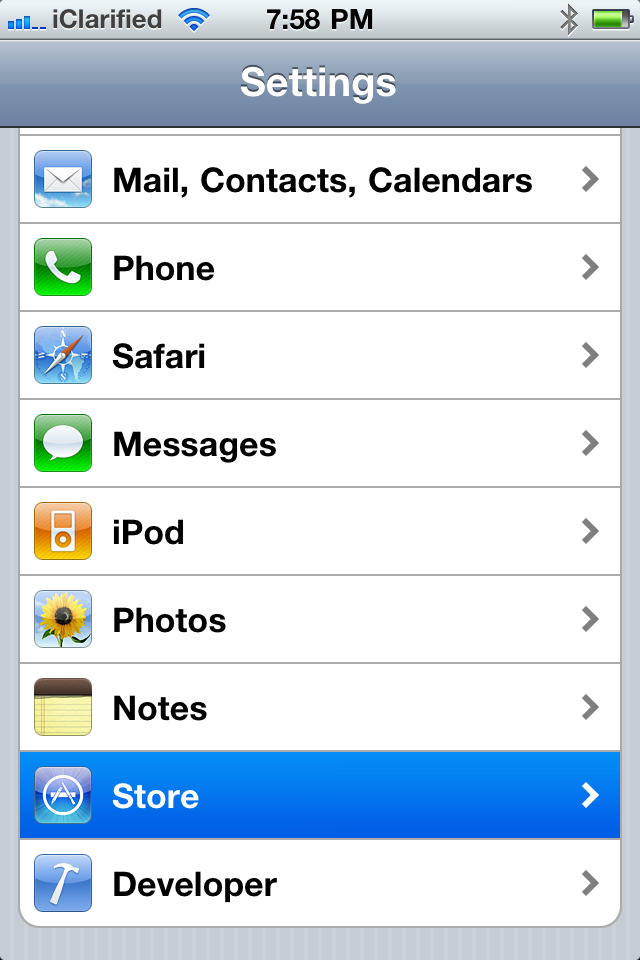
Step ThreePress the Sign In button if you are not already Signed In.
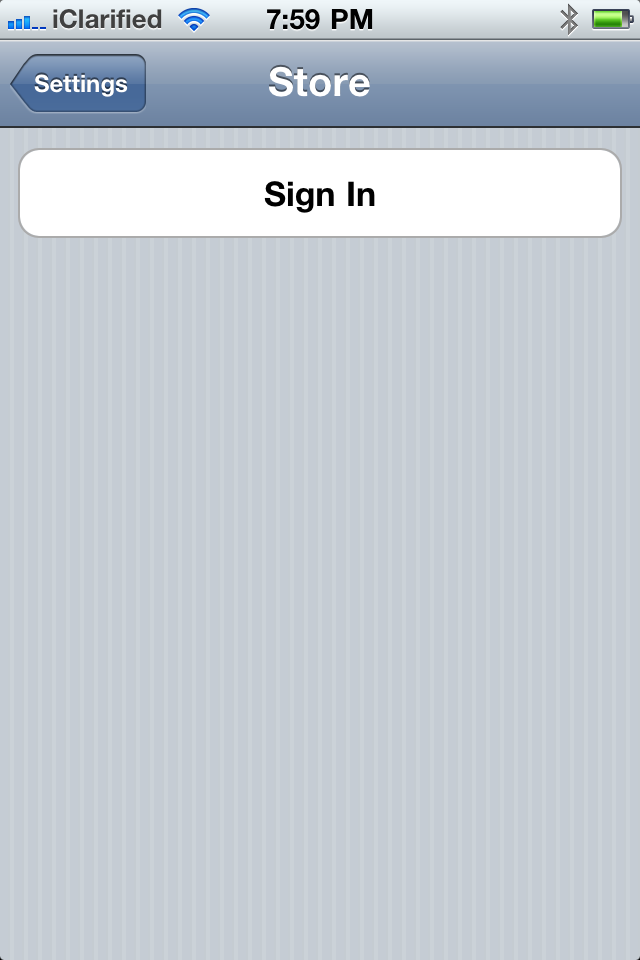
Step FourTo enable Automatic Downloads for Apps, iTunes, or iBooks turn the respective switch to the ON position.
To enable Automatic Downloads while you are on the cellular network turn the Cellular switch to the ON position.


Now when you purchase or download a new app, song, or book the item will automatically be pushed to all your devices.
Saturday, October 5, 2013
5 best Free Android calendar apps you should download in 2013
The calendar plays a very important role in our daily life, whether keeps track of the meetings you have or remind us about the work, and so much more. So download a calendar app on your android device is really necessary and helpful. Android has a ton of really, really great calendar apps, here is the 5 best Free Android calendar apps I have picked that you should download in 2013.
Source from: Top 6 Best Calendar Apps for Android Mobile Phones on Google Play
 Top1: MyCalendar
With MyCalendar app, you will never forget your friends birthdays again! This app takes note of your friends birthdays and sets up notification so you can easily message your friends and wish them "Happy Birthday�.
To start with, add friends� birthday from your Facebook and your contacts list. Then Customizable reminder settings and others.
Key Features:
.jpg "Jorte Calendar") Top2: Jorte Calendar
Top2: Jorte Calendar
With over 13 million downloads, Jorte is one of the most popular calendar/organizer applications, which can show your tasks list under your calendar, and show your days agenda under the month view when you click on it.
Features:
.jpg "Smooth Calendar") Top3: Smooth Calendar
Top3: Smooth Calendar
This app is really simple to use, and have a clean, good looking calendar widget. It displays multiple upcoming events and automatically synchronizes calendars with the built-in Google calendar. The key customizations offered with this application are the choice of display, number of events to be displayed and number of days the user would like to check an event for. Further, the ability to change the size and color of the widget is also offered.
Features:
.jpg "Business Calendar Free") Top4: Business Calendar Free
Top4: Business Calendar Free
Business Calendar is a complete calendar application that is synchronizing with your Google calendars! It comes with a great and smooth interface where you just pinch to zoom in and out. Instead of having views for "week", "4-day", "month", and so on, you start with a month view and can tap and drag on a certain set of days to shrink the view to those days.
Features:
.jpg "aCalendar - Android Calendar") Top5: aCalendar - Android Calendar
Top5: aCalendar - Android Calendar
aCalendar is a great free application that shines with its great and unique weekly view of events. Flipping right and left takes you in monthly and daily views, but what we love the most is the huge tiles for the weekly view, and the widget is also great. What we don�t like that much is the lack of integration with Google Maps.
Features:
Read More..
Source from: Top 6 Best Calendar Apps for Android Mobile Phones on Google Play
With MyCalendar app, you will never forget your friends birthdays again! This app takes note of your friends birthdays and sets up notification so you can easily message your friends and wish them "Happy Birthday�.
To start with, add friends� birthday from your Facebook and your contacts list. Then Customizable reminder settings and others.
Key Features:
- Import birthdays from Facebook
- Add birthdays of all contacts from your phone and add custom birthdays
- Customizable reminder settings: delivers notifications straight to your iPhone)
- Easily message your friends and wish them "Happy Birthday " along with custom message with just one click!
With over 13 million downloads, Jorte is one of the most popular calendar/organizer applications, which can show your tasks list under your calendar, and show your days agenda under the month view when you click on it.
Features:
- Jorte Cloud: Original Cloud feature for multi-device use and backup.
- Various widget settings are available.
- Monthly and Weekly views are available.
- Important appointments are shown in red.
- See completed appointments at a glance.
- It can synchronize with Google Calendar.
- Adjust the starting day of the week on each view; it doesnt always have to be Sunday!
- Import the Holidays of your choice from Google Calendar.
- Import and Export the contexts to CSV format.
- It can be controlled using Google Voice Search and Google Maps.
This app is really simple to use, and have a clean, good looking calendar widget. It displays multiple upcoming events and automatically synchronizes calendars with the built-in Google calendar. The key customizations offered with this application are the choice of display, number of events to be displayed and number of days the user would like to check an event for. Further, the ability to change the size and color of the widget is also offered.
Features:
- Many different options and features, can Displays anything from one to six upcoming events. Smooth Calendar has one of the highest satisfaction rates currently off all android widgets, currently a 4.5 rating on the android market.
- Can schedule events up to one year into the future!
- Ability to sync up with your Google calendar on your desktop computer is painless and easy.
Business Calendar is a complete calendar application that is synchronizing with your Google calendars! It comes with a great and smooth interface where you just pinch to zoom in and out. Instead of having views for "week", "4-day", "month", and so on, you start with a month view and can tap and drag on a certain set of days to shrink the view to those days.
Features:
- smooth scroll- and zoomable multi-day view (1-14 days)
- graphical and textual presentation
- month, agenda, day and event view
- quickly fade in/out calendars using the favorite bar
- search function
- configurable widgets in different sizes for month, week, agenda and day view (3 design themes for each widget type)
- easy switching between timeline bars and event titles in month view
- intuitive new handling option: just move your finger over some days of interest in month view to open them in the multi-day view
- quick day overview when adding a new event
- many options for recurrent events (e.g. to add a recurrent event that takes place every other week on Tuesday and Thursday)
aCalendar is a great free application that shines with its great and unique weekly view of events. Flipping right and left takes you in monthly and daily views, but what we love the most is the huge tiles for the weekly view, and the widget is also great. What we don�t like that much is the lack of integration with Google Maps.
Features:
- intuitive navigation with smooth transitions
- day, week & month calendar
- 48 colors per calendar, per-event color if supported by the calendar (Android Jelly Bean with Google Calendar only)
- custom event font size
- Fullscreen widgets
- flexible recurrences (e.g., every 3 weeks)
- birthdays & anniversaries with photos from your addressbook and editing
- Duplicate events
- uses Androids native calendar backend and synchronization
- no battery drain
- moon phases and zodiac signs for birthdays
- QR barcode sharing of events
- NFC sharing (if supported by the device) NEW
- 12/24h clock honoring system settings
- optimized text display and improved line-break
- free
- no ads
Here Wish all of you have a better life with these apps.
Friday, October 4, 2013
Trick How to Display or Hide a Widget In Blog

Trick How to Display or Hide a Widget In Blog - You have a lot of widgets that appear on your blog? Blog widget that too many of course will reduce the speed of loading of our own blog. However, if the widget it was important for you and still wants to maintain its existence it helps you do the settings on any page you want to show the blog. A widget for example, will you show it only on Homepage orvice versa. You also can display a widget only on specific URLs.
1. How do I show only widgets only on Homepage
=> Place the widget code between the following code
<b:if cond=data:blog.url == data:blog.homepageUrl>
Advertise YOUR CODE HERE
</ B: if>
2. How do I hide a widget from our Homepage
=> Place the widget code between the following code
<b:if cond=data:blog.pageType == "item">
Advertise YOUR CODE HERE
</ B: if>
3. How do I show widgets only on pages Static Page
=> Place the widget code between the following code
<b:if cond=data:blog.pageType == "static_page">
Advertise YOUR CODE HERE
</ B: if>
4. How do I hide the widget from the page Static Page
=> Place the widget code between the following code
<b:if cond=data:blog.pageType != "static_page">
Advertise YOUR CODE HERE
</ B: if>
5. How to display the widget only on specific URLs
=> Place the widget code between the following code
<b:if cond=data:blog.url Your Choice == "URL disini">
Advertise YOUR CODE HERE
</ B: if>
6. How do I hide certain widgets from the URL
=> Place the widget code between the following code
<b:if cond=data:blog.url != disini"> "URL Your Choice
Advertise YOUR CODE HERE
</ B: if>
So how do I show or hide the default widget from blogger yourself? such as About me, Archive, Label and so forth.
Usually the blogger default code will look like this
<b:widget id=HTML locked=false title=JUDUL WIDGET ANDA type=Profile>
<b:includable id=main>
WIDGET CODE DEFAULT YOUR BLOGGER
</ B: includable>
</ B: widget>
To control this widget you just need to insert control codes according to what you want.Suppose you want to show widgets only on Homepage only, then put the code on the No. 1 above as below
<b:widget id=HTML locked=false title=JUDUL WIDGET ANDA type=Profile>
<b:includable id=main>
<b:if cond=data:blog.url == data:blog.homepageUrl>
YOUR WIDGET CODE
</ B: if>
</ B: includable> </ b: widget>
Tuesday, October 1, 2013
10 Best iPad Applications In 2012

10 Best iPad Applications In 2012 - IPad application requirements appropriate to the company more and more, with functions that can be used for work. With the development of more advanced application that creates a lot of usefulness for the company, so employees can be constructive and not just sitting at his desk, but when they are away from the desk can do the job.
Now Apple users can take advantage of the tremendous growth of wireless access. The application introduces a service update to Keynote, Numbers and Pages include data in the near future. Among them is the Office OS X and Applications IOS with 3G and Wi-Fito sync so that employees do work while traveling or at work.
The following are the 10 Best iPad Applications In 2012:
1. Quickoffice Pro HD

This application can be used easily to share Office files through the keynote. Interface with the look of the Professional, including the ease of synchronization with Google Docs.Users are also facilitated when sharing a separate file such as text documents,presentations and spreadsheets. By using the Quickoffice Pro HD The three files can be sent with just one send.
Quickoffice Pro HD using a standard format, so there is no further requirement for userswho want to share documents. If no internet connection, users can work locally,otherwise if there is a connection, either Wi-Fi or 3G, users can work through the onlineserver. The drawback is that the module has no layout functionality Pages, Keynote or Numbers.
2. LogMeIn Ignition
LogMeIn is an application used to update the server IP address and service with detailsof your broadband router. If you leave your computer at work, the client software on your iPhone or iPad will be connected and can find your computer is left on the Internet, which allows you to view the screen while controlling the mouse and keyboard remote.
Did you forget to read the email? No problems with LogMeIn, simply log in from nearby Wi-Fi connection and you can send an email to your iPad.
3. GoodReader for iPad

GoodReader is an application to display Microsoft documents and PDG, archivesSafari, iWorkfiles, video, images and audio. The elegant display contains a variety of features including screen brightness slider to change the navigation easy for you to slide through the page or bookmark set and location number.
If you read a complex PDF documents, GoodReader provides an alternative to clear the picture, leaving only the text. This is a great way to keep up with the reports that you might want to read on the train or bus on your way home.
The program contains the tools menu located on the side with the ability to save the original file. Can save files directly in the form of Zip.
4. Wunderlist HD

Wunderlist HD is an application serves as the registrar a list of your tasks and schedules that can appear on the desktop menu, so it will not forget your work schedule.
5. Pen-ultimate

Pen-ultimate is An application that we can use as a paperback book, with lots of colors like a pen. There are also several options including the paper used. It looks very attractive and exclusive.
6. Plain Text

PlainText contains many features and is one of the best available application writing. Plaintext is a simple text editor with an uncomplicated, paper-like user interface. Unlike the default Notes app, allows you to create plain text and organize your documents in folders and sync everything with Dropbox.com. The synchronization application with your personal computer or MAC is really cool, one of the features of the application is that every time you stop, you will upload the document.
7. Skype

Skype is one of the best applications in the field of technology that is can used for telephone. By implementing a Voice Over IP technology (VoIP), you can contact others in the hemisphere without having to use any telephone. You can contact friends, family, business associates or anyone else without having to move from your work in front of the notebook or desktop computer.
8. Evernote

These applications facilitate employees to write down ideas quickly and will be listed on the indexed. You can set the record in private collections in the notebook, describing it using keywords strategically to help you find it later. Ever note can be paired with desktop client. This is one of the fastest ways to create a digital scrapbook.
9. SugarSync

SugarSync is similar to the hard drive. This application can be installed on other devices,this means you and your friends can share the same data set. This program lets you choose the folder you want to synchronize on your personal computer. SugarSync will copy everything to your own online storage, including synchronization with your other devices. This proves how simple and easy to get the images to the iPad when you need them for a presentation or document.
10. Dropbox

Dropbox is an indispensable tool storage online. You can manage all of your personalcomputer and the MAC to log in, use the same information as the iPhone or iPad, and you will be synchronized on all three. Shown to safely store any files, and enhance security against losing your iPad, because your work will always be backed up directly online . This program is free up to 2GB of storage. For more details see photoDropbox Automatic Upload for Android.
Any Tricks hopefully this article can help you with using the iPad, thank you for your visit.
Thursday, September 26, 2013
Apple Cheap iPhone 4 Leaked In Brazil
Even before Apple confirmed iPhone 5 release event, we had been hearing about the possibility of two iPhone releasing in 2011. It really does look like Apple will release two iPhones at the October 4 iPhone 5 release event, as a cheap iPhone 4 has been leaked in Brazil.

Gizmodo Brazil have got their hands on leaked cheap iPhone 4 pictures. Supposedly, the Foxconn factory in Brazil supposed to manufacture iPads has a lot more on their hands other than Apples magical tablet.

Gizmodo Brazil have got their hands on leaked cheap iPhone 4 pictures. Supposedly, the Foxconn factory in Brazil supposed to manufacture iPads has a lot more on their hands other than Apples magical tablet.
Most of these photos don’t look like anything special—just snapshots of a familiar face. But when you get to the last one, a picture of a Foxconn Brazil quality control form, you’ll notice something strange: a different model number, N90AJust so youre not confused, N90A iPhone model is not the iPhone 4S weve been hearing about. The iPhone 4S is codenamed N94, while this cheap iPhone 4 model is codenamed N90A. If reports about cheap iPhone 4 are correct, it is going to have 8GB of on board memory and will heavily use iCloud. The other iPhone is going to be the iPhone 5 which is going to have a new design, new processor and a better camera.
Sunday, September 22, 2013
Apple iPad 2 launching in 13 more countries This Week Confirmed
According to Apple that iPad 2 launching in 13 more countries,
China will get WiFi iPad 2 beginning Friday, May 6.
The device will go on sale in:
Japan on Thursday, April 28, 2011
and in eleven additional countries on Friday, April 29, 2011:
Hong Kong,
India,
Israel,
Korea,
Macau,
Malaysia,
Philippines,
Singapore,
South Africa,
Turkey

CUPERTINO, California—April 27, 2011—Apple® today announced that iPad® 2, the second-generation of its breakthrough post-PC device, will arrive in Japan on Thursday, April 28 and Hong Kong, Korea, Singapore and eight additional countries on Friday, April 29. iPad 2 will be available at Apple retail stores at 9 a.m. local time, select Apple Authorized Resellers, and online through the Apple Store® (http://www.apple.com/) beginning at 1 a.m. Additionally, iPad 2 with Wi-Fi will be available in China beginning Friday, May 6.
iPad 2 features an entirely new design that is 33 percent thinner and up to 15 percent lighter than the original iPad, while maintaining the same stunning 9.7-inch LED-backlit LCD screen. iPad 2 features Apple’s new dual-core A5 processor for blazing fast performance and stunning graphics and now includes two cameras, a front-facing VGA camera for FaceTime® and Photo Booth®, and a rear-facing camera that captures 720p HD video, bringing the innovative FaceTime feature to iPad users for the first time. Though it is thinner, lighter, faster and packed with new features, iPad 2 still delivers up to 10 hours of battery life* that users have come to expect.
Pricing & Availability
iPad 2 with Wi-Fi will be available in Japan on April 28 and Hong Kong, India, Israel, Korea, Macau, Malaysia, Philippines, Singapore, South Africa, Turkey and UAE on April 29 for a suggested retail price of $499 (US) for the 16GB model, $599 (US) for the 32GB model and $699 (US) for the 64GB model. iPad 2 with Wi-Fi + 3G will be available for a suggested retail price of $629 (US) for the 16GB model, $729 (US) for the 32GB model and $829 (US) for the 64GB model. iPad 2 with Wi-Fi will be available in China on May 6, and further international availability will be announced at a later date.iMovie® and GarageBand® for iPad apps are available for $4.99 (US) each from the App Store℠ on iPad orwww.itunes.com/appstore. The Smart Cover is available in a range of colors in vibrant polyurethane for $39 (US) or rich leather for $69 (US).
Friday, September 20, 2013
10 Best Laptop In 2012

10 Best Laptop In 2012 - Laptop is a technology who use by many people in the world, it is have many function as media entertainment, to work, to school and so forth.
Companies that produce more and increase the performance of any laptop on the laptop that they produce, ranging in terms of laptop design, competitive price, processor speed, memory and hard drive capacity, up to the better screen quality.
All was done in order to grab the attention of potential consumers, the end of 2011 some laptop manufacturers started to produce new laptop for sale in 2012.
Laptop that I am relating this is not a gaming laptop that has the specs to play the game is super heavy, and requires specification of the number one, but laptops are usually used for general activities, such as college, work at the office, watching movies, and so forth.
On this occasion I will present the worlds 10 best laptop in 2012 by toptenreviews.com
In the below is 10 best laptop in 2012 :
1. HP Pavilion DM4X

Specifications :
Design:
- Screen Resolution: 1366 x 768
- Screen Size: 14 in
Performance:
- Processor: Intel Core i5-2410M
- Processor Speed: 2.3 GHz
- Video Card: Intel HD Graphics 3000
- Audio: Integrated
- Operating System: Windows 7 Home Premium
Feature:
- Wifi
- Webcam
- Memory Card Reader
- Built-in Mic
- Bluetooth
Memory/HDD:
- Memory RAM: 6 GB
- Hard Drive: 640 GB
Battery/Warranty:
- Battery: 7 Hours
- Warranty: 1 Year
2. Dell XPS 15z

Specifications :
Design:
- Screen Resolution: 1366 x 768
- Screen Size: 15.6 in
Performance:
- Processor: Intel Core i5-2410M
- Processor Speed: 2.3 GHz
- Video Card: NVIDIA GeForce GT 525M
- Audio: Integrated
- Operating System: Windows 7 Home Premium
Feature:
- Wifi
- Webcam
- Memory Card Reader
- Built-in Mic
- Bluetooth
Memory/HDD:
- Memory RAM: 6 GB
- Hard Drive: 750 GB
Battery/Warranty:
- Battery: 8 Hours
- Warranty: 1 Year
3. Apple Macbook Air

Specifications :
Design:
- Screen Resolution: 1440 x 900
- Screen Size: 13.3 in
Performance:
- Processor: Intel Core i5-2557M
- Processor Speed: 1.8 GHz
- Video Card: Intel HD Graphics 3000
- Audio: Integrated
- Operating System: Mac OS X Lion
Feature:
- Wifi
- Webcam
- Memory Card Reader
- Built-in Mic
- Bluetooth
Memory/HDD:
- Memory RAM: 4 GB
- Hard Drive: � GB
Battery/Warranty:
- Battery: 7 Hours
- Warranty: 1 Year
4. Acer Aspire Ethos

Specifications :
Design:
- Screen Resolution: 1920 x 1080
- Screen Size: 15.6 in
Performance:
- Processor: Intel Core i7-2630QM
- Processor Speed: 2.0 GHz
- Video Card: NVIDIA GeForce GT 555M
- Audio: Integrated
- Operating System: Windows 7 Home Premium
Feature:
- Wifi
- Webcam
- Memory Card Reader
- Built-in Mic
- Bluetooth
Memory/HDD:
- Memory RAM: 6 GB
- Hard Drive: 750 GB
Battery/Warranty:
- Battery: 7 Hours
- Warranty: 1 Year
5. Sony S Series

Specifications :
Design:
- Screen Resolution: 1600 x 900
- Screen Size: 13.3 in
Performance:
- Processor: Intel Core i3-2310M
- Processor Speed: 2.1 GHz
- Video Card: AMD Radeon HD 6630M
- Audio: Integrated
- Operating System: Windows 7 Home Premium
Feature:
- Wifi
- Webcam
- Memory Card Reader
- Built-in Mic
- Bluetooth
Memory/HDD:
- Memory RAM: 4 GB
- Hard Drive: 320 GB
Battery/Warranty:
- Battery: 7 Hours
- Warranty: 1 Year
6. HP Pavilion dv7t Series

Specifications :
Design:
- Screen Resolution: 1600 x 900
- Screen Size: 17.3 in
Performance:
- Processor: Intel Core i3-310M
- Processor Speed: 2.1 GHz
- Video Card: Intel HD Graphics 3000
- Audio: Integrated
- Operating System: Windows 7 Home Premium
Feature:
- Wifi
- Webcam
- Memory Card Reader
- Built-in Mic
- Bluetooth
Memory/HDD:
- Memory RAM: 6 GB
- Hard Drive: 500 GB
Battery/Warranty:
- Battery: 5 Hours
- Warranty: 2 Year
7. Apple Macbook Pro

Specifications :
Design:
- Screen Resolution: 1440 x 900
- Screen Size: 15.4 in
Performance:
- Processor: Intel Core i7
- Processor Speed: 2.2 GHz
- Video Card: Intel HD Graphics 3000
- Audio: Integrated
- Operating System: Mac OS X 10.6
Feature:
- Wifi
- Webcam
- Memory Card Reader
- Built-in Mic
- Bluetooth
Memory/HDD:
- Memory RAM: 4 GB
- Hard Drive: 500 GB
Battery/Warranty:
- Battery: 7 Hours
- Warranty: 1 Year
8. Toshiba Portege R835-P56X

Specifications :
Design:
- Screen Resolution: 1366 x 768
- Screen Size: 13.3 in
Performance:
- Processor: Intel Core i5-2410M
- Processor Speed: 2.3 GHz
- Video Card: Mobile Intel HD Graphics
- Audio: Integrated
- Operating System: Windows 7 Home Premium
Feature:
- Wifi
- Webcam
- Memory Card Reader
- Built-in Mic
Memory/HDD:
- Memory RAM: 4 GB
- Hard Drive: 640 GB
Battery/Warranty:
- Battery: 9 Hours
- Warranty: 1 Year
9. Lenovo Thinkpad X220

Specifications :
Design:
- Screen Resolution: 1366 x 768
- Screen Size: 12.5 in
Performance:
- Processor: Intel Core i5-2420M
- Processor Speed: 2.5 GHz
- Video Card: Intel HD Graphics 3000
- Audio: Integrated
- Operating System: Windows 7 Professional
Feature:
- Wifi
- Webcam
- Memory Card Reader
- Built-in Mic
- Bluetooth
Memory/HDD:
- Memory RAM: 2 GB
- Hard Drive: 320 GB
Battery/Warranty:
- Battery: 8 Hours
- Warranty: 1 Year
10. HP ENVY 14 Series

Specifications :
Design:
- Screen Resolution: 1366 x 768
- Screen Size: 14.5 in
Performance:
- Processor: Intel Core i5-2410M
- Processor Speed: 2.3 GHz
- Video Card: Radeon HD 6630
- Audio: Integrated
- Operating System: Windows 7 Home Premium
Feature:
- Wifi
- Webcam
- Memory Card Reader
- Built-in Mic
- Bluetooth
Memory/HDD:
- Memory RAM: 6 GB
- Hard Drive: 500 GB
Battery/Warranty:
- Battery: 6 Hours
- Warranty: 2 Year
Wednesday, September 18, 2013
How to back up your iOS device in five minutes via iCloud

If youve invested in an iPhone, iPad, or iPod Touch, you probably keep some very important information on your device that you wont want to lose. What would happen to your files, photos, and everything else on your iOS device if it were lost, stolen, or severely damaged?
The best way to safeguard your Apple mobile device is to back up your data. With iOS, you have two simple options for backing up: Use iCloud or use iTunes. This article explains how to back up using iCloud.
iCloud is Apples own cloud-based storage and backup solution. It comes included with your device, so its free to use (for up to 5GB worth of data, as Ill explain in more detail below). You should be able to progress through the following instructions for backing up using iCloud in about five minutes. Below the step-by-step instructions, youll also find a quick overview of how to restore your device using iCloud, should you need to. As well as that, Ive included a list of things that do get backed up using this method, along with a list of things that dont.
How to back up iPhone and iPad using iCloud
- Go to Settings > iCloud > Storage & Backup.
- Under Backup, turn on the switch for iCloud Backup.

- Go back one screen and turn on or off the data you want backed up from the selections. Youll notice that not all your apps appear here, only the pre-installed Apple apps. At this stage, you can consider yourself finished with the backup if dont want to back up anything else on your phone. If youre finished, skip ahead to the final step in this section (“Connect your iPhone or iPad to a Wi-Fi signal”). If you do want to back up more of your non-Apple apps, continue through the rest of the following steps.

- Scroll all the way down to Storage & Backup, and tap it.
- Choose the third choice shown, Manage Storage.
- Under the heading Backups, select the entry for your phone. Mine is simply named "Jills Phone." The resulting page may take a moment or two to load.
- You should now be on a page called Info. Under the heading Backup Options, youll see a list of the top five storage-using apps, plus another button labelled "Show All Apps." Press Show All Apps, and you can now choose which items you want to back up. You should back up apps that contain important information or files, as well as apps that you have taken a lot of time to customise. I personally wouldnt back up most apps that use a cloud service because all the app data you care about is already being hosted by the provider – not locally on your phone.

- As you decide which of your apps you dont want to back up, toggle those to "off." A red button reading "Turn Off & Delete" will appear. If you click it, youll still have the app and its data locally on your iPhone. All youre "deleting" is the data from iClouds backup. At the bottom of the screen, youll see how much space you have available. Apple gives you 5GB of iCloud storage free. Of course, if you want to back up more, you can pay Apple for extra storage space, starting at £14 a year for an additional 10GB.
- Connect your iPhone or iPad to a Wi-Fi signal, plug it into a power outlet, and leave the screen locked (in other words, dont use the device). Your iPhone or iPad will automatically backup once a day when it meets these three conditions. You can also manually initiate a backup to iCloud by connecting your iPhone or iPad to a Wi-Fi signal, and selecting Back Up Now under Settings > iCloud > Storage & Backup.
How to restore iPhone and iPad using iCloud
- When launching a new (or newly wiped) iOS device, a Setup Assistant will automatically ask if you want to "Restore from iCloud Backup." Choose this option to restore your old iPhone or iPads data, apps and settings.
- Enter your iCloud username and password.
- Youll see the three most recent backups to choose from. In most cases, youll want the latest one.
- From this point, the iPhone or iPad will pretty much do the rest. Enter passwords when prompted, and dont mess with your phone while that progress bar is still doing its thing. iCloud will restore your apps to the version you had rather than the most up-to-date version, unless the previously stored version is no longer available, in which case it defaults to the most recent.
What will be backed up
- Music purchased through iTunes (but not in all countries).
- Apps.
- Books purchased through iTunes.
- Photos in the Camera Roll.
- Videos in the Camera Roll.
- Notes in the Notes app.
- Device settings (for example, Phone Favourites, Wallpaper, and Mail, Contacts, Calendar accounts).
- App data.
- Home screen and app organisation.
- Messages (iMessage, SMS, and MMS).
- Ringtones.
What wont be backed up
- Media files synced from your computer arent backed up, but can be restored by syncing with iTunes.
- Apps, books, and music that have subsequently been removed from the App Store, iTunes Store, and iBookstore since you downloaded or purchased them
Monday, September 16, 2013
Important Safety tips for Girls in Dangerous situations
Now a days, We have been brought to the notice of many worst attacks on the Girls of my nation. I often feel ashamed of the action of those culture less barbarians. Most of the girls and their families are now having the insecurity feeling while going out. In some places, even some families fear to send the women out of the house alone. This is definitely not a good sign for the development of the one of the biggest democratic country like India. So, I came up with this article which features some precautionary and safety measures to all the Girls of my nation to be safe from some barbaric people who bring bad name to the whole nation. Though these may not help all the girls, but even if it helps one girl to get saved, then the purpose of my article was fulfilled.
Now I will take some common circumstances where girls should be careful and what they should do at those situation.
1. When some strangers follow you, when you are going alone in the road at late night.
The best way to save in those situation is try to enter an ATM. Every ATM will have a security guard, even though there was no security, ATMs are under 24 hours coverage of Close Circuit cameras. So fearing identification, nobody will dare to attack you .
2. When you have to go by lift in a high building, with a stranger accompanying you.
There may be danger that the stranger will attack you. the best thing to do in that case is Press the buttons of all the floors in between the floor you have to reach". I think no person will dare to attack you if the lift opens at every floor.
3. When you hire a taxi or auto at night.
The first thing to do is "Note down the registration number" of the auto or taxi. While travelling, Call some one or just pretend that you have called some one and Say them the details of the vehicle in the language that the driver knows. Then driver will get to know that, if any thing happens, he will be in trouble. Hence he will not try to attack you.
4. When you notice that the taxi is going in the wrong route
If you notice that the auto or taxi is not going in the direction or route of your destination, then take a cloth or your dupatta, wrap it around his neck and pull it hardly against the driver seat. With in few seconds, he will feel suffocated and lose his energy to attack you. It gives you the chance to escape. If you dont have that cloth, then pull him back holding his shirt , his top button of the shirt will do the same action as the cloth does.
5. When an Intruder enters your house when you are alone.
This is one of the most frequent and dangerous situations a woman will be facing. If any intruder or strangers enters your house and is ready to attack on you. Then try to run into your kitchen. If girls want, they can turn kitchen into a war field where the weapons are only known to them. They only know where the knifes, forks, Chilli powder and turmeric are there. Those can be converted in to very dangerous weapons. Use them and escape from him. If they are not available, try to through all the vessels at the intruder and try to shout as loud as possible. Vessels will make a heavy noise and your shouts will make the neighbours know that you are in danger so that they will come to your rescue.
Some common Suggestion for Girls
1. Use Prepaid Taxi if available.
When you went to a new place at night by train or a Flight. In many cities there is a facility of Prepaid taxi or auto available at Railway stations, Airports and Bus stands. There you should give the money in advance at the counter and the they will allot the taxi. They will note down the taxi number with them, Thus the taxi driver will not try to attack you as his name was registered there.
2. Use Technology effectively
When you went to a new place, use the modern technology more effectively. Use the Google maps and GPS system features effectively to know whether you are going in a correct route or not. You can also notice that you are in danger, if some taxi driver is misleading you. So use them effectively.
3. Always activate Speed dial in your mobile phone.
Almost all the mobile phones have speed dial facility. If you hold a number for a while, automatically a call will go to the number you have saved in the speed dial. If you are in a sudden danger, then this feature will help as it needs very less time. You can speed dial to your dear ones and then try to shout, so that the other person may realize that you are in danger and have chance to help you.
4. Have some safety items in your hand bag
Always have some safety items in your hand bag. The best weapon to have in the purse is Chilli powder or a Pepper gas in your handbag. You can use it in some extreme cases of danger. Also be careful that those should not go into the hands of the attacker, as he may use them on you.
5. Noise is the best enemy of the attacker
If you are in danger, always try to make as much as noise as possible. That noise will alert the neighbours around you that You are in danger. Intruder always fear of being recognised, so he will ran away out of fear.
Always be alert when you are alone and if you dont have any of above cases, try to fight as much as you can , you will definitely get the chance to escape and being saved.
Some of the above tips are taken from some posts in facebook and some are added by me but the intension of these to help the girls of my nation. So as a part of your responsibility to make this article to reach all the Girls in India.. Share it to all the girls.
Read More..
Now I will take some common circumstances where girls should be careful and what they should do at those situation.
1. When some strangers follow you, when you are going alone in the road at late night.
The best way to save in those situation is try to enter an ATM. Every ATM will have a security guard, even though there was no security, ATMs are under 24 hours coverage of Close Circuit cameras. So fearing identification, nobody will dare to attack you .
2. When you have to go by lift in a high building, with a stranger accompanying you.
There may be danger that the stranger will attack you. the best thing to do in that case is Press the buttons of all the floors in between the floor you have to reach". I think no person will dare to attack you if the lift opens at every floor.
3. When you hire a taxi or auto at night.
The first thing to do is "Note down the registration number" of the auto or taxi. While travelling, Call some one or just pretend that you have called some one and Say them the details of the vehicle in the language that the driver knows. Then driver will get to know that, if any thing happens, he will be in trouble. Hence he will not try to attack you.
4. When you notice that the taxi is going in the wrong route
If you notice that the auto or taxi is not going in the direction or route of your destination, then take a cloth or your dupatta, wrap it around his neck and pull it hardly against the driver seat. With in few seconds, he will feel suffocated and lose his energy to attack you. It gives you the chance to escape. If you dont have that cloth, then pull him back holding his shirt , his top button of the shirt will do the same action as the cloth does.
5. When an Intruder enters your house when you are alone.
This is one of the most frequent and dangerous situations a woman will be facing. If any intruder or strangers enters your house and is ready to attack on you. Then try to run into your kitchen. If girls want, they can turn kitchen into a war field where the weapons are only known to them. They only know where the knifes, forks, Chilli powder and turmeric are there. Those can be converted in to very dangerous weapons. Use them and escape from him. If they are not available, try to through all the vessels at the intruder and try to shout as loud as possible. Vessels will make a heavy noise and your shouts will make the neighbours know that you are in danger so that they will come to your rescue.
Some common Suggestion for Girls
1. Use Prepaid Taxi if available.
When you went to a new place at night by train or a Flight. In many cities there is a facility of Prepaid taxi or auto available at Railway stations, Airports and Bus stands. There you should give the money in advance at the counter and the they will allot the taxi. They will note down the taxi number with them, Thus the taxi driver will not try to attack you as his name was registered there.
2. Use Technology effectively
When you went to a new place, use the modern technology more effectively. Use the Google maps and GPS system features effectively to know whether you are going in a correct route or not. You can also notice that you are in danger, if some taxi driver is misleading you. So use them effectively.
3. Always activate Speed dial in your mobile phone.
Almost all the mobile phones have speed dial facility. If you hold a number for a while, automatically a call will go to the number you have saved in the speed dial. If you are in a sudden danger, then this feature will help as it needs very less time. You can speed dial to your dear ones and then try to shout, so that the other person may realize that you are in danger and have chance to help you.
4. Have some safety items in your hand bag
Always have some safety items in your hand bag. The best weapon to have in the purse is Chilli powder or a Pepper gas in your handbag. You can use it in some extreme cases of danger. Also be careful that those should not go into the hands of the attacker, as he may use them on you.
5. Noise is the best enemy of the attacker
If you are in danger, always try to make as much as noise as possible. That noise will alert the neighbours around you that You are in danger. Intruder always fear of being recognised, so he will ran away out of fear.
Always be alert when you are alone and if you dont have any of above cases, try to fight as much as you can , you will definitely get the chance to escape and being saved.
Some of the above tips are taken from some posts in facebook and some are added by me but the intension of these to help the girls of my nation. So as a part of your responsibility to make this article to reach all the Girls in India.. Share it to all the girls.
Thursday, September 12, 2013
How to Put iPhone 4 3GS in DFU Mode
How to put iPhone 4, 3GS in DFU Mode ? many of the new users of iPhone 4, 3GS are asking this question. What is the meaning of DFU mode? It means Device Firmware Update. Lets see how to put iPhone 4, 3GS in DFU mode after the jump.
What is the difference between DFU mode and Recovery Mode :
Recovery Mode : Recovery Mode is a state of iBoot that is used during standard upgrades and restores. As iBoot is active, it does not allow you to downgrade your device’s software. Also, unless it is ‘pwned,’ it will not allow custom firmware to be flashed.
DFU Mode : DFU Mode is a special mode where the device can still interface with iTunes, yet it does not load the iBoot. The screen will appear totally black in DFU mode, so you can’t guess whether the device is in DFU or powered down from simply looking at the screen. Because iBoot and the OS are not loaded this exploit makes us able to downgrade your iPhone firmware or upgrade with a custom firmware created by Pwnage tool.
How to put iPhone 4, 3GS in DFU mode :
Required Downloads:
- Download iTunes for Windows / Mac
Steps to enter DFU mode :
Step 1 : Connect your iPhone with your PC then open iTunes
Step 2 : Press and hold the Home button and the Sleep button at the same time.
Step 3 : After 10 seconds release Sleep button but keep holding the Home button until iTunes pops up this message "iTunes has detected an iPhone in recovery mode. You must restore this iPhone before it can be used with iTunes". And your iPhone will remain in black screen.
Now you have successfully put iPhone in DFU mode.


Tuesday, September 10, 2013
How To Install Windows 8 In A Virtual Machine at your Mac

Microsoft has been showing if its upcoming Windows 8 operating system at its BUILD conference in California this week, and while I may be completely dedicated to my Mac, I can’t help but think Windows 8 looks pretty darn nice.
We’ve already showed you how to install the Developer Preview on a Boot Camp partition on your Mac, but there is an easier method for those of you who just want to play around. In this how-to, we’ll take you through the setup for installing Windows 8 in a virtual machine — in just four simple steps.

Step 1: Download Windows 8 Developer Preview
The first thing you’ll need, if you haven’t already got it, is the Windows 8 Developer Preview build.You can download this from dev.windows.com. You’ll have a choice between the 32-bit and 64-bit builds. I recommend you go for the former — it’s just 2.9GB as opposed to 3.6GB, and it’s all you’ll really need to play around with.

The Windows 8 download will be a .iso file, and will likely be saved to your ‘Downloads’ folder. However, be sure to keep a note of its location — you’ll need this in step 3.

Step 2: Download VMware Fusion 4.0
Once you have your Windows 8 Developer Preview, you’ll need an application to run the virtual machine. We’re going to use VMware Fusion for this for two reasons: Firstly, it’s the easiest to set up, and secondly, if you don’t already have it you can download a free 30-day trial.VMware Fusion 4.0 launched just last week, and is completely compatible with OS X Lion. Once you’ve downloaded the application, install it on your Mac.

Step 3: Setup Your Windows 8 Virtual Machine
So, now you have your Windows 8 download and you’ve installed VMware Fusion 4. Open up VMware Fusion and choose to create a new virtual machine. Click the ‘Continue without disc’, and then ‘Choose a disk or disk image…’.
Step 4: Locate Your Windows 8 Download & Install
Navigate to your Windows 8 Developer Preview .iso file and click ‘Next’. VMware will now ask you to choose your operating system. Windows 8 will not be available, so just select Microsoft Windows 7 instead. Click ‘Continue’ and then click ‘Finish’ in the next window.
Now wait while VMware Fusion performs its magic and sets up your Windows 8 partition. This shouldn’t take too long, but it will depend on the speed of your Mac.

Your Windows 8 virtual machine will now be set up and ready for you to play around with. Enjoy!
Subscribe to:
Posts (Atom)