Showing posts with label team. Show all posts
Showing posts with label team. Show all posts
Tuesday, October 15, 2013
iPhone Dev Team Releases Untethered Jailbreak for iOS 4 3 1
Three years ago (almost to the day!), the first version of PwnageTool was released for firmware 1.1.4. So today we’re excited to release another edition of both PwnageTool and redsn0w to bring an untethered jailbreak for Apple’s latest firmware, FW 4.3.1.
WARNING WARNING — ultrasn0w users don’t update yet! See a few paragraphs down!
The 4.3.1 untether exploit comes courtesy of Stefan Esser (@i0n1c on twitter), a security researcher based in Germany. Stefan has a long history of vulnerability research, and ironically his first contribution to the iPhone jailbreak community was improved security — last year he beat Apple to the punch and implemented ASLR for jailbroken iPhones with his “antid0te” framework. We’re happy to see that Stefan then turned his iPhone attention over to an untethered jailbreak exploit!
The 4.3.1 untether works on all devices that actually support 4.3.1 except for the iPad2:
iPhone3GS
iPhone4 (GSM)
iPod touch 3G
iPod touch 4G
iPad1
AppleTV 2G (PwnageTool only for now)
The reason the untether won’t work as-is on the iPad2 is that it requires a bootrom or iBoot-level exploit to install, and the iPad2 is not susceptible to either the limera1n or SHAtter bootrom exploits.
WARNING WARNING — ultrasn0w users don’t update yet! We need to first release an update to ultrasn0w that fixes some incompatibilities when FW 4.3.1 is used on the older basebands supported by ultrasn0w. And remember once we do fix ultrasn0w for 4.3.1 (we’ll announce it here and on twitter), you must only get there via a custom IPSW from PwnageTool, Sn0wbreeze or xpwn! Don’t ever try to restore or update to a stock IPSW, or you’ll lose the unlock!
For everyone else, redsn0w is the easier program to use (and redsn0w runs on both Mac and Windows).
Read More..
WARNING WARNING — ultrasn0w users don’t update yet! See a few paragraphs down!
The 4.3.1 untether exploit comes courtesy of Stefan Esser (@i0n1c on twitter), a security researcher based in Germany. Stefan has a long history of vulnerability research, and ironically his first contribution to the iPhone jailbreak community was improved security — last year he beat Apple to the punch and implemented ASLR for jailbroken iPhones with his “antid0te” framework. We’re happy to see that Stefan then turned his iPhone attention over to an untethered jailbreak exploit!
The 4.3.1 untether works on all devices that actually support 4.3.1 except for the iPad2:
iPhone3GS
iPhone4 (GSM)
iPod touch 3G
iPod touch 4G
iPad1
AppleTV 2G (PwnageTool only for now)
The reason the untether won’t work as-is on the iPad2 is that it requires a bootrom or iBoot-level exploit to install, and the iPad2 is not susceptible to either the limera1n or SHAtter bootrom exploits.
WARNING WARNING — ultrasn0w users don’t update yet! We need to first release an update to ultrasn0w that fixes some incompatibilities when FW 4.3.1 is used on the older basebands supported by ultrasn0w. And remember once we do fix ultrasn0w for 4.3.1 (we’ll announce it here and on twitter), you must only get there via a custom IPSW from PwnageTool, Sn0wbreeze or xpwn! Don’t ever try to restore or update to a stock IPSW, or you’ll lose the unlock!
For everyone else, redsn0w is the easier program to use (and redsn0w runs on both Mac and Windows).
DOWNLOAD section:
For MAC users:
http://www.mediafire.com/?vv5jvmcpiyrr2p6
For Win users:
http://www.mediafire.com/?a891j0muajd4550
HOW TO:
NOTE: the process is identical on both Mac OSX and Windows, and also identical with previous redsn0w releases. The images used in this tutorial are from previous redsn0w tutorial, so do not be alarmed.
1. Restore your device with a stock iOS 4.2.1 firmware. ( again, by doing this you will loose the ability to unlock!!!)
2. Run redsn0w, and click on browse. Browse for the stock iOS 4.2.1 and open it
3. Wait for redsn0w to recognize it and click ‘Next’
4. On the next screen select what you want to be installed on your iOS device(s). By default, Cydia and ‘enable battery percentage’ is selected. I suggest you deselect battery percentage and everything else, and just install Cydia. This will improve ( a bit ) the overall speed of your device – if you are on a iPhone 3G. If you choose to “Enable battery percentage”, you actually toggle that off and on via Settings->General->Usage.
IF you only need to restore with a custom firmware, deselect everything, and select only “Just enter pwned DFU mode right now”
5. redsn0w will ask you to turn your device off. If it’s not already off, plug it in FIRST and then turn it off. Click next to continue
6. Now, you will need to put your device in DFU mode. Follow the instructions on the screen.
7. Wait a few seconds for redsn0w to do its thing, and you are done. You can close redsn0w because everything else it’s happening directly on the device.
NOTE: Any Windows users seeing “Waiting for reboot” for too long (more than 20 seconds or so), please try “shaking” the JB process by unplugging then replugging your USB cable (while letting redsn0w continue to run). Also, try using a USB port “closer” to your computer (as opposed to on your monitor or behind another hub).


Saturday, October 12, 2013
iPhone Dev Team Releases Redsn0w 0 9 15b2 with Some Bug Fixed
The iPhone Dev-Team has updated Version 0.9.15b2 with some bug fixes for iPhone 3GS and iPad owners.
Version 0.9.15b2 fixes a few issues for 3GS owners: old-bootrom awesomeness is no longer forgotten directly after a restore, and iPad baseband upgrade/downgrade support is fixed (same production date cutoffs apply!). If your 3GS is currently tethered at 6.0 even though you have an old bootrom, just re-run redsn0ws Jailbreak step (no need to restore). Dont forget you can add some pizzaz with your own boot logo or a nerdy verbose boot.

Monday, October 7, 2013
Redsn0w 0 9 9b2 releases by Dev Team
Redsn0w 0.9.9b2
Update #10: Version 0.9.9b2 has been released with fixes and enhancements related to: Verizon iPhone4 firmware detection, Fix Recovery, Stitching, and blob processing. If you encountered a problem with any of these in the b1 version, please try b2.
Here are the download links:


Tuesday, October 1, 2013
redsn0w 0 9 6rc13 Untethered iOS 4 3 2 Jailbreak Redsn0w by Dev Team
Only a few weeks after the 4.3.1 untether created by @i0n1c was released, Apple pushed out firmware 4.3.2. Thankfully, it appears Apple didn’t have a chance to fix the hole used by @i0n1c’s untether, so he ported his code over to 4.3.2’s kernel. Today’s redsn0w has been updated to include it.
The 4.3.2 untether works on all devices that actually support 4.3.2 except for the iPad2:
- iPhone3GS
- iPhone4 (GSM)
- iPod touch 3G
- iPod touch 4G
- iPad1
redsn0w 0.9.6rc13:
- Windows redsn0w
As always, ultrasn0w unlockers should stay away from redsn0w and only update their firmware through a custom IPSW. We’ll release a new version of PwnageTool sometime this week.
Note that many people are currently having problems updating to 4.3.2 through saurik’s server. You’ll need to remove the gs.apple.com entry in your hosts file in order to restore directly to Apple’s servers.

Saturday, September 28, 2013
redsn0w 0 9 9b5 Released By Dev Team
The iPhone Dev-Team has released a tethered jailbreak for iOS 5. Currently only the Mac version has been made available; however, the Windows version is coming soon.
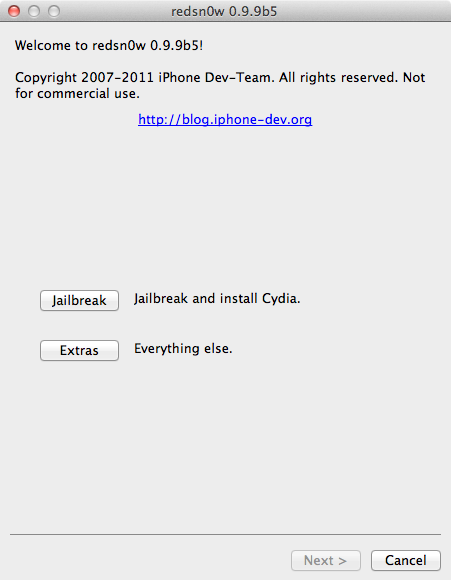
With todays official iOS5 release, redsn0w has been updated to 0.9.9b5 to include the public URLs for the IPSW files. This way, first-time iOS5 jailbreakers dont need to supply the IPSW file manually. Its still a tethered jailbreak on all except the old-bootrom iPhone3GS, and it doesnt apply to iPad2 or the upcoming iPhone4S.
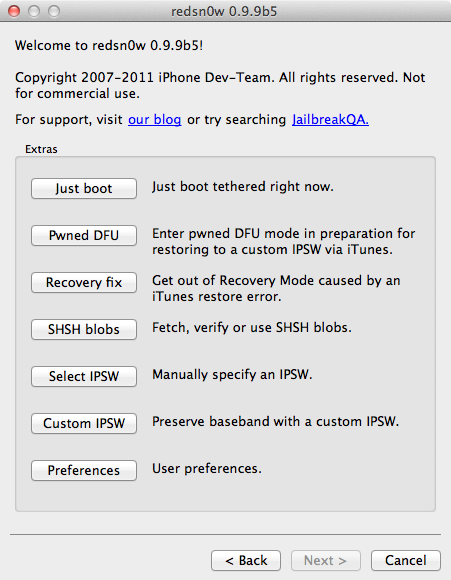
Because the jailbreak is currently only tethered for most devices, were not going to release a new PwnageTool yet. Instead, weve decided to build some of PwnageTools functionality into redsn0w (since you need redsn0w to "Just boot tethered" on every power cycle anyway). The new "Custom IPSW" button on the Extras screen will create a custom IPSW without the baseband update for 4.3.3 or 5.0gm (iPhone3GS and iPhone4 only, for now). Remember not to accidentally restore to the stock IPSW after you create the custom one! The custom one begins with NO_BB_ (for "no baseband").
You must enter "Pwned DFU" mode before trying to use the NO_BB_ IPSW with iTunes (and your hosts file cannot be pointing to Cydias servers due to the new blob nonce mechanism theyre using in iOS5).
Version 0.9.9b5 only available for Mac for now, until we can do more testing on the Windows version of "Custom IPSW".
Were currently working on a normal compatibility update for existing ultrasn0w unlockers. After that well try to fix the iBooks issue on jailbroken iOS5.
Here are the download links:
- redsn0w 0.9.9b5 for Mac
- redsn0w 0.9.9b4 for Windows (version 0.9.9b5 after more testing)
Monday, September 23, 2013
Help Chronic Dev Team to Find Jailbreak Vulnerability for U Jailbreak Ios5 Win Mac
Greetings, friends & jailbreakers!
It has now been several months since I (posixninja) took the stage at JailbreakCon (fka MyGreatFest) in London. Since then, I & other members of the Chronic Dev team have been keeping quietly busy on many fronts, so I thought it was about time to give you all a brief update.
Update on iOS5 Jailbreak
First & foremost: during my JailbreakCon talk in September, I was excited to announce that the Chronic Dev team had already discovered 5 different exploits for use in our upcoming jailbreak. Unfortunately, that announcement was a bit premature, because in the subsequent weeks, Apple found & patched a (critical) few of those exploits, between the beta versions we used for testing and the final release of iOS5 on October 12.Sadly (and trust us, we are much more sad about this than any of you could possibly be), this has prevented us from being able to release a new jailbreak as quickly as we wanted to. As I hinted at earlier this week on Twitter, I was initially disheartened to think that so many of the countless hours we’ve worked on this jailbreak seemingly went right down the drain.Not to mention, these are by no means the first exploits that have been “lost” by Chronic Dev (or any other iOS hacking teams) in this manner. In fact, these are just a few in a long-running series of exploits that were patched by Apple before we hackers could make use of them in a free jailbreak for you, our loyal fans.Well, to be frank… this is bull****!!! And now, Chronic Dev is ready to turn this little information battle into an all-out, no-holds-barred information WAR. So we want to use this experience as an opportunity to explain the method Apple uses to find potential vulnerabilities, as well as to unveil our new master plan, which should not only prevent this from happening to us again in the future, but also allow us to use all of you to find more exploits, so we can ultimately get an untethered jailbreak into your hands as quickly as possible.How Apple Finds Exploits
One of the primary challenges in working with userland exploits is that, every time any program crashes on your iPhone, a “crash report” is generated and instantly sent back to Apple. As you can imagine, while we’re working out all the kinks in the exploitation of a vulnerability, we may need to crash any particular program thousands & thousands of times.
It’s possible to change your iTunes settings to stop sending this diagnostic information back to Apple, and of course everyone in Chronic Dev has made this change on all our development machines. However, even this is not always 100% effective at preventing Apple from obtaining our data. For instance, if one of us is at a friend’s house and plugs our iPhone up to his or her computer (even just to charge it), it’s very likely that computer is set up to send all our valuable data & crash reports right back to Apple.
As a side note, this is also the primary reason we’re unable to perform or allow any public beta testing of our software before it’s released. Any potential beta tester could be unknowingly sending crash reports back to Apple, which would prematurely alert the company to our exploits & the discovery of their vulnerabilities before we even have the chance to release.Help Us Help You: Send Us Your Crash Reports
Instead of allowing this vicious cycle to continue, we decided to write a new program to turn Apple’s own beast against its master, per se. All this program requires from you is to attach your iOS device to your computer and click a single button!
At this point, the program copies all the crash reports off your device (which, under normal circumstances, would be sent right back to Apple), and instead sends this data to a secure, private server hosted by your friendly Chronic Dev team. Next, our program proceeds to neuter your copy of iTunes, simply by changing your settings to prevent your computer from sending any further diagnostic information from your device to Apple.
Using this agglomeration of your crash reports and our ninja skills, Chronic Dev will be able to quickly pinpoint vulnerabilities in various programs by using the same techniques Apple currently employs. At the very least, your data will help point us in the direction of which applications are the most vulnerable, so we can focus our time & energy on these with laser-like intensity. And, of course, this will also prevent Apple from accessing all your valuable data, just so they can then turn around and use it against you.
Thank You!Many thanks in advance for your prompt response & help in this effort, your continued support of GreenPois0n & the Chronic Dev team, and your patience while we continue our never-ending, diligent work on your (free!! coming soon!) untethered jailbreak for iOS5 and/or iPhone 4S.
One final THANKS! While I have spent many of my own hours on the development, design & programming of this tool, especially the back-end, I also owe a great debt of gratitude to:
- C-Dev hacker Nikias & his lovely wife Hanene – for the many tedious hours they spent programming the front-end & user-friendly interface;
- C-Dev member OPK – for his graphic design work & the brilliant logo for this app; and
- Chronic-Dev, LLC – for graciously hosting the servers where we will store the (fingers crossed) millions of crash reports and other data that you all are going to send us momentarily, via this link…
NOTE : This link is to the Mac beta version of our software. An updated/final Mac version as well as a Windows version will be available in the next 24 hours.Finally, we will be making a more concerted effort to keep you updated on our progress in the days & weeks to come, so keep checking back here on our blog!

Monday, September 16, 2013
Dream Team releases Untethered Jailbreak for iPhone 4S iPad 2 !
A5 Jailbreak released Only Mac Windows Soon!!!

We are well-aware of how very many of you, our faithful fans, have been waiting for months for this announcement, so – with no further ado, we are excited to unveil the newest addition to our GreenPois0n toolkit…
Untethered Jailbreak for iPhone 4S & iPad 2 !
This release should come as no surprise to those of you who have been following pod2g’s iOS blog for the past few months. Earlier this week, you might have even wet your pants a little when you watched the video demonstration of today’s release (named Absinthe A5) and first witnessed our jailbreak working its magic to liberate both the iPhone 4S & iPad 2.
What you may not fully realize yet is just how hard the exploits in this Apple A5 jailbreak are working behind the scenes – and, though I mentioned it last week on my Twitter – what a glorious hacker’s wet dream the Absinthe A5 toolkit has ultimately evolved into!
Hacking the A5: Not Exactly a Walk in the Park
The ridiculously complex combination of exploits-within-exploits that make this iOS jailbreak possible have consumed thousands of hours of brain-power & effort from a legion of world-renowned hackers, several of whom have been working diligently on this project since the dual-core A5 processor was unveiled by Apple last March. Ten months ago, I myself was live tweeting from a tediously long line at the nearest Apple retail store, where I anxiously waited to become one of the world’s first owners (& hackers) of the newly-released iPad 2.
At that point, I don’t know if any iOS hacker anticipated how much the A5 chip would completely change the game & up the stakes. The endless war we fight to jailbreak has become more & more difficult with each new device released, and our recent battle against A5 only proved this further. After working for months with few tangible results, Chronic Dev hackers tried a new approach – we launched CDevReporter to accumulate all your devices’ crash reports, an invaluable source of information for iOS hacking & research. You answered our call-to-arms quickly & emphatically, sending us more than 10 million of these reports in less than a week. (Keep up the good work!)
Meanwhile, the iPhone 4S was released with resounding success – more than four million devices were sold in the first weekend alone. As a result, demand for an untethered A5 jailbreak grew exponentially overnight, and a mob-like mentality was adopted by many of the (usually courteous) Apple fan-kids. Suddenly, every iOS hacker found himself the target of constant clamoring – on Twitter, in our (& other) blog’s comments, in forums & tech news blurbs. Their message was loud & clear: “We want our new iPhones jailbroken, & we want it NOW!”
Introducing the 2012 iOS Hacking “Dream Team”
We finally admitted that the escalated obstacles presented by Apple’s new A5 processor would not likely be overcome by one individual or team – but all together, we should be more than able to conquer any challenges encountered. As such, a diverse group of iOS hackers all decided to set aside our personal goals & egos, relax our die-hard team loyalties, and pool our respective skill-sets, talents & exploits to form an iOS Super-Hacking “Dream Team.”
Numerous prominent iOS hackers contributed time & expertise to the project through their troubleshooting, brilliant obstacle-clearing ideas & other support. We’d like to extend special thanks to saurik & MuscleNerd, both core members of iPhone Dev Team.
Of the 4 hackers who deserve extra recognition & gratitude for completing the lion’s share of the research, development & programming of this jailbreak, 3 are members of Chronic Dev Team: myself (posixninja), pod2g & nikias. The fourth & most legendary member of our “Dream Team” is planetbeing, the globally-admired iOS hacker/developer responsible for initially porting both Linux & Android to the iPhone (among his many other contributions).
As to the amazingly innovative fusion of exploits used in this iOS jailbreak – we plan to save most of that discussion for a panel/presentation we hope to give at a conference later this year. If you want to learn more now, pod2g wrote an excellent blog post after the release of Corona, in which he describes in detail the userland & kernel exploits we used, both for the A4 iOS 5.0.1 untethered jailbreak and as a starting point for this Absinthe A5 toolkit.
Help Advance our Ongoing iOS Research & Support the Future of Jailbreaks!
CONTRIBUTE HERE directly to Chronic Dev TeamSay “THANK YOU!” to Developers of this A5 Jailbreak for a Job Well Done!
CONTRIBUTE HERE to iOS Hacking “Dream Team”Download GreenPois0n Absinthe Now
To jailbreak your iPhone 4S (running iOS 5.0 or either 4S version of 5.0.1**) and/or your iPad 2 (all Wi-Fi only, GSM & CDMA devices supported; must be running iOS 5.0.1**) – select one of the links below to download your Absinthe A5 untethered jailbreak. Simply unzip the file, then install on your iOS A5 mobile device with one click of a button! As always MacOSX version is being released first, and Windows and Linux versions will be released shortly after.

Windows » Coming Soon…
Mac OS X » GreenPois0n Absinthe v0.1.2-1
Mirror LINks » Mac Os X
Mediafire LInk » Mac Version
Mirror LINks » Mac Os X
Mediafire LInk » Mac Version
Linux » Coming Soon…
**NOTE: If you haven’t yet heeded the advice I gave weeks ago – before you take one step further, upgrade your firmware to iOS 5.0.1 NOW! (Unless you need an iPhone4s Unlock) Also, we don’t mean to beat you over the head with this warning, but please remember: you should not update to iOS 5.0.2 when it’s released, or you will lose your jailbreak! Bookmark our GreenPois0n blog now, and be the first to know the next time we advise our jailbreak users to safely update their iOS firmware.As with all our previous GreenPois0n releases, should you run into any bugs in the A5 jailbreak, leave us a comment below or contact us on Twitter (via Chronic Dev Team, GreenPois0n, or directly to “Dream Team” hackers posixninja, pod2g or nikias). Even if we aren’t able to respond to your messages individually, we depend on all users to let us know about any issues you run into so that we can address them & fix the most-reported problems as quickly as possible.
Muchas Gracias
First & foremost, THANK YOU to all our loyal fans & readers for your enduring patience over the past several months. We’ve been toiling night & day in order to perform the serious hacking ninja magic required to develop the most advanced iPhone jailbreak yet – we only hope it was worth your wait! And as always, thank you for your never-ending support of Chronic Dev Team & all our GreenPois0n releases!
I also want to express my personal gratitude to:
- saurik – for all your guidance & support, especially in helping us out of the sandbox, and for acting as administrator to the “Dream Team” donation fund;
- Chronic-Dev, LLC – for hosting the web servers that will inevitably crash due to the sheer number of simultaneous download requests; and
- finally & especially, the other “Dream Team” members – for all your expertise, dedication, cooperation & countless hours of hard work! It was a true pleasure to work closely with each of you, and without your contributions, this jailbreak would not have been possible.
Wednesday, September 11, 2013
Dev Team Restoration reinvigoration
Today we’re pleased to release redsn0w version 0.9.15b1, with significant new features supporting restoring to older firmware no longer being signed by Apple. For brevity, we’ll list most of the new features in bullet form. For more details, please feel free to drop by our comments section, or check out any upcoming guides on tutorial sites like http://iclarified.com
First, the high-level new feature list:
- restore from any 5.x iOS to any other (up, down or the same) 5.x iOS on all devices as long as you have the correct blobs (see more below)
- Cydia now included in the tethered 6.0 jailbreak on A4 devices
- automatically “Just Boot” tethered when qualifying A4 device connects in DFU mode
- untethered 6.0 jailbreak on old-bootrom 3GS
- untethered 6.0 hactivation on any 3GS or iPhone4
- directly restore pre-A5 devices to earlier firmware — no more complicated 15-step how-to’s with stitching, iTunes errors, and “hosts file” concerns
- fetch new signed blobs for any IPSW (present or future — no redsn0w update required) using Extras->SHSH Blobs->New
- block the BB update for any 3GS or iPhone4 restore (past, present, or future — no redsn0w update required) using Extras->Even More->Restore
- deactivate any iPhone, useful for testing your “official” unlock status through iTunes. (Please only deactivate your own iPhone!)
- activation status shown on “Even more” page
- significantly more (very nerdy) info returned by “Identify” button when device is in Normal mode
- tethered jailbreak of ATV2 supported (but the only thing available for it is the SSH2 custom bundle available here — no Cydia yet. Must use “Select IPSW” for tethered boot of ATV2 for now).
- auto-exit WTF mode for older devices with broken buttons
- any time a set of blobs is fetched remotely (from Apple or Cydia), redsn0w also saves them locally (and will check there first if you click “Local”)
- for your future restoring convenience, you should also submit all of your past and present TinyUmbrella blobs to Cydia if you haven’t done so yet. Resubmitting is okay and won’t cause conflicts.
Here are more details on the iOS5-to-iOS5 restores for A5+ devices. (Note: pre-A5 devices don’t have these restrictions — just follow the redsn0w prompts during the restore).
1. redsn0w now lets you restore an A5+ device from any iOS5 to any other iOS5 as long as you have correct 5.x blobs for the starting (current) and ending points of the restore
- APtickets eliminated “higher-version only” comparison of firmware restores (just like BBtickets did for the baseband)
- example restores supported by redsn0w if you have the correct blobs: 5.1.1-to-5.0.1, 5.0.1-to-5.1.1, 5.1.1-to-5.1.1, 5.0.1-to-5.0.1
- if you don’t have the blobs locally, let redsn0w try to fetch them remotely (redsn0w always tries both Apple and Cydia). Any succesful remote fetch also saves a local copy too.
2. You DO NOT QUALIFY for iOS5-to-iOS5 restores if you got to your current 5.x via an OTA update
- the tickets saved by Cydia, redsn0w, and TinyUmbrella do not cover OTA update ramdisk images
- even if they did, it’s the “wrong kind” of ramdisk (you’d need to start at that earlier pre-OTA FW)
- devices fresh from factory or refurb may fall in the “does not qualify” category (your results will vary)
- it’s okay if you previously got to 5.x via an OTA update, as long as your current 5.x was installed via a normal iTunes restore. All that matters is how you got to your current 5.x most recently
- redsn0w detects an OTA/normal-restore APticket mismatch very early, so if you don’t know your status there should be no harm in trying. Any device in recovery mode after such a mismatch can boot normally again just by going back to “Even More” screen from the “Restore” screen (or use “Recovery Fix” if you quit redsn0w before doing that).
3. Unlike the A4 devices, redsn0w can’t (usefully) prevent the baseband updates of A5+ iPhones and iPads.
- and so, redsn0w automatically flashes the currently signed baseband when it does A5+ restores, even if those basebands didn’t come with the original firmware
- stay away from this if you have an unofficial unlock that isn’t supported by the newest baseband
- the least-tested baseband update code in redsn0w is for iPad2,3 and iPad3,2. Please give any feedback on those iOS5 restores in the comments section below.
4. iPad2 owners (all three models) with saved 4.x blobs can use those instead, even from 6.x
- if you have both 4.x and 5.x iPad2 blobs, you can always get to 5.x via the 4.x blobs, even if you’re currently on 6.x
- you cannot get to 5.x from 6.x without the 4.x blobs (but you may still qualify for the iOS5-to-iOS5 restore described above)
- if somehow you have 4.x blobs but no 5.x blobs, you can still go down to 4.x from 6.x
- this only applies to iPad2 owners (they’re the only A5+ devices that ever had a public 4.x FW)
- redsn0w still supports (but doesn’t require) jailbreaking A5+ devices at 5.0.1 and 5.1.1. Just head back to the first page after re-restoring to 5.x. It’s always much faster to jailbreak those FW versions with a freshly-restored device, before letting iTunes restore from a saved userland backup.
And finally, some random details:
5. ultrasn0w isn’t yet updated for 6.x
- by now you probably should be taking advantage of the extremely cheap IMEI-based unlocks of iPhones sold by established online retailers like http://cutyoursim.com
- still, IMEI-based unlocks don’t work in all cases. We’ll announce when ultrasn0w is ported up to 6.x
- redsn0w will still hactivate your 3GS or iPhone4 if you run it before the device is activated. Due to the current tethered 6.x JB status, redsn0w now hactivates 6.x without requiring subsequent tethered boots. If you accidentally hactivate with redsn0w, use the “Deactivate” checkbox available from the Jailbreak screen, not the normal one in “Even more”
6. As always, redsn0w lets you “Fetch” the SHSH blobs currently flashed onto your pre-A5 device
- use this if you’re at 5.x or 4.x but without having saved your blobs when the window was open
- this is only useful when Apple is no longer signing the firmware, otherwise Cydia/redsn0w “New”/TinyUmbrella blobs are superior (but you’re welcome to fetch your 6.0 blobs this way anyway)
- fetching blobs in this fashion will automatically forward them up to Cydia, as well as save a local copy
We realize there’s a lot of info in this post. If you’re at all confused about things remember to visit our comments section, with our very helpful user base and moderators like dhlizard, Frank55, 41willys, and slavakulikoff.
If you’re in the Melbourne, Australia area, MuscleNerd (and another anonymous long-time Dev Team member) will be giving some talks at the Breakpoint conference http://www.ruxconbreakpoint.com this week. And @mdowd’s iOS talk at the same conference should be quite interesting too! We’ll also all be attending Ruxcon a few days later, so say hi if you see us!
Update #1 (Oct 15): Version 0.9.15b2 fixes a few issues for 3GS owners: old-bootrom awesomeness is no longer forgotten directly after a restore, and iPad baseband upgrade/downgrade support is fixed (same production date cutoffs apply!). If your 3GS is currently tethered at 6.0 even though you have an old bootrom, just re-run redsn0w’s Jailbreak step (no need to restore). Don’t forget you can add some pizzaz with your own boot logo or a nerdy verbose boot.
Here are the download links. Enjoy!
- redsn0w 0.9.15b2 (OS X — use Ctrl-Click->Open if on Mountain Lion for now)
- redsn0w 0.9.15b2 (Windows — run in Adminstrator Mode)
Monday, September 9, 2013
iPhone 4S Jailbreak Done by iPhone Dev Team Release Imminent ScreenShot
Good News! iPhone Dev-team has successfully jailbroke iPhone 4S as MuscleNerd just tweeted about the very preliminary iPhone 4S jailbreak on his Twitter account. He also posted two pictures that shows Cydia running on iPhone 4S on iOS 5.

Along with this good news, there is a bad news too. It is clear from the statement of MuscleNerd that there is still a lot of work left in the jailbreak for 4S that is preventing public release. But it is confirmed that the release of iPhone 4S jailbreak is imminent. Also jailbreaking iPhone 4S on iOS 5 means we have iPad 2 jailbreak as well because both iPad 2 and iPhone 4S has the same bootrom. But for all this, you have to wait as you did for iPad 2 jailbreak on 4.3.3.
Please dont fall for the scammers that tell you we can bring untethered jailbreak on iOS 5 . They all are scammers. Please stay away from them. When untethered jailbreak for iOS 5, iPhone 4S and iPad 2 becomes official, we will let you know.
VERY preliminary 4S JB:http://twitpic.com/76vcp4 http://twitpic.com/76vct2 (Huge missing pieces prevent public release. LOTS of work left)

Along with this good news, there is a bad news too. It is clear from the statement of MuscleNerd that there is still a lot of work left in the jailbreak for 4S that is preventing public release. But it is confirmed that the release of iPhone 4S jailbreak is imminent. Also jailbreaking iPhone 4S on iOS 5 means we have iPad 2 jailbreak as well because both iPad 2 and iPhone 4S has the same bootrom. But for all this, you have to wait as you did for iPad 2 jailbreak on 4.3.3.
Please dont fall for the scammers that tell you we can bring untethered jailbreak on iOS 5 . They all are scammers. Please stay away from them. When untethered jailbreak for iOS 5, iPhone 4S and iPad 2 becomes official, we will let you know.
Subscribe to:
Posts (Atom)