Tuesday, October 15, 2013

iOS 5 0 1 Custom Firmware without Baseband update Tethered Jailbreak


There is a simple way to update to iOS 5.0.1 without basebande update . easy unlock and jailbreak . Its a Tethered jailbreak for all device except iPad 2 and iPhone 4s. This iOS 5.0.1 custom firmware made with Sn0wbreeze v2.8b11.There is same ready custom firmwares with 6.15.00 basebond . if you get iTunes 16XX error use iREB.
Click here to enlarge
Requirements :

1 . Custom firmware for Device :
NOTE: If you have original carrier sim card use unactivated and if you have not use active one.
————————————————
Download custom firmware iPhone 4 /Activated ——————-> {FileSonic | Hotfile}
Download custom firmware iPhone 4 /Unactivated —————-> {FileSonic | Hotfile}
————————————————
Download custom firmware iPhone 3Gs /Activated —————-> {FileSonic | Hotfile}
Download custom firmware iPhone 3Gs /Unactivated ————-> {FileSonic | Hotfile}
iPhone 3Gs New Bootrom – BaseBand 6.15.00 / Activated ——–> {FileSonic | Hotfile}
————————————————
iPhone 3Gs Old Bootrom [Untethered Jailbreak] /Activated —————————–> {FileSonic | Hotfile}
iPhone 3Gs Old Bootrom [Untethered Jailbreak] /Unactivated ————————–> {FileSonic | Hotfile}
iPhone 3Gs Old Bootrom [Untethered Jailbreak]-BaseBand 6.15.00/Activated –> {FileSonic | Hotfile}
Read More..

redsn0w 0 9 10b3


Update #3: The b3 version of redsn0w fixes a problem where re-running redsn0w over an existing jailbreak would cause MobileSubstrate-based apps to stop running until MS was installed again. Now you can re-run the redsn0w jailbreak step without worrying about that (but still remember to de-select the “Install Cydia” option if it’s already installed).


TIP: If auto-detection fails and redsn0w tells you no identifying data was found, you can always pre-select the appropriate 5.0.1 IPSW using “Extras->Select IPSW


Download
Read More..

iPhone Dev Team Releases Untethered Jailbreak for iOS 4 3 1

Three years ago (almost to the day!), the first version of PwnageTool was released for firmware 1.1.4. So today we’re excited to release another edition of both PwnageTool and redsn0w to bring an untethered jailbreak for Apple’s latest firmware, FW 4.3.1.

WARNING WARNING — ultrasn0w users don’t update yet! See a few paragraphs down!


The 4.3.1 untether exploit comes courtesy of Stefan Esser (@i0n1c on twitter), a security researcher based in Germany. Stefan has a long history of vulnerability research, and ironically his first contribution to the iPhone jailbreak community was improved security — last year he beat Apple to the punch and implemented ASLR for jailbroken iPhones with his “antid0te” framework. We’re happy to see that Stefan then turned his iPhone attention over to an untethered jailbreak exploit!

The 4.3.1 untether works on all devices that actually support 4.3.1 except for the iPad2:

iPhone3GS
iPhone4 (GSM)
iPod touch 3G
iPod touch 4G
iPad1
AppleTV 2G (PwnageTool only for now)
The reason the untether won’t work as-is on the iPad2 is that it requires a bootrom or iBoot-level exploit to install, and the iPad2 is not susceptible to either the limera1n or SHAtter bootrom exploits.

WARNING WARNING — ultrasn0w users don’t update yet! We need to first release an update to ultrasn0w that fixes some incompatibilities when FW 4.3.1 is used on the older basebands supported by ultrasn0w. And remember once we do fix ultrasn0w for 4.3.1 (we’ll announce it here and on twitter), you must only get there via a custom IPSW from PwnageTool, Sn0wbreeze or xpwn! Don’t ever try to restore or update to a stock IPSW, or you’ll lose the unlock!

For everyone else, redsn0w is the easier program to use (and redsn0w runs on both Mac and Windows).

DOWNLOAD section:

For MAC users:
http://www.mediafire.com/?vv5jvmcpiyrr2p6
For Win users:
http://www.mediafire.com/?a891j0muajd4550

HOW TO:

NOTE: the process is identical on both Mac OSX and Windows, and also identical with previous redsn0w releases. The images used in this tutorial are from previous redsn0w tutorial, so do not be alarmed.

1. Restore your device with a stock iOS 4.2.1 firmware. ( again, by doing this you will loose the ability to unlock!!!)

2. Run redsn0w, and click on browse. Browse for the stock iOS 4.2.1 and open it

Click here to enlarge

3. Wait for redsn0w to recognize it and click ‘Next’

Click here to enlarge

Click here to enlarge

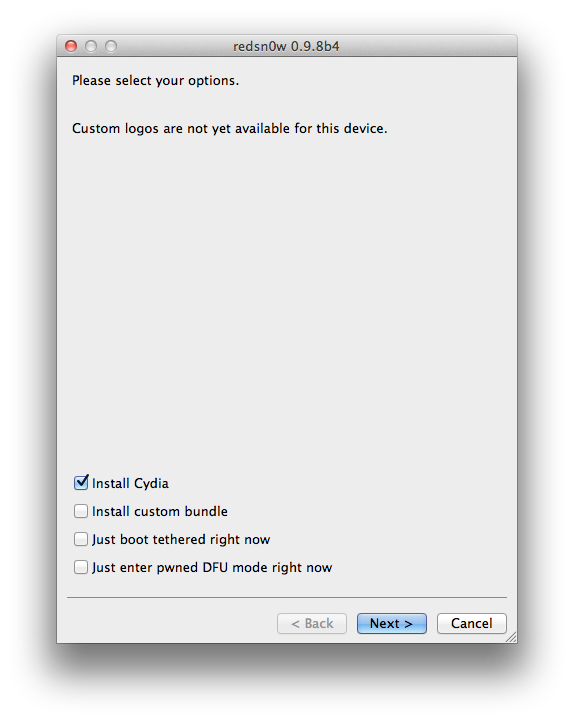
4. On the next screen select what you want to be installed on your iOS device(s). By default, Cydia and ‘enable battery percentage’ is selected. I suggest you deselect battery percentage and everything else, and just install Cydia. This will improve ( a bit ) the overall speed of your device – if you are on a iPhone 3G. If you choose to “Enable battery percentage”, you actually toggle that off and on via Settings->General->Usage.

IF you only need to restore with a custom firmware, deselect everything, and select only “Just enter pwned DFU mode right now”

Click here to enlarge

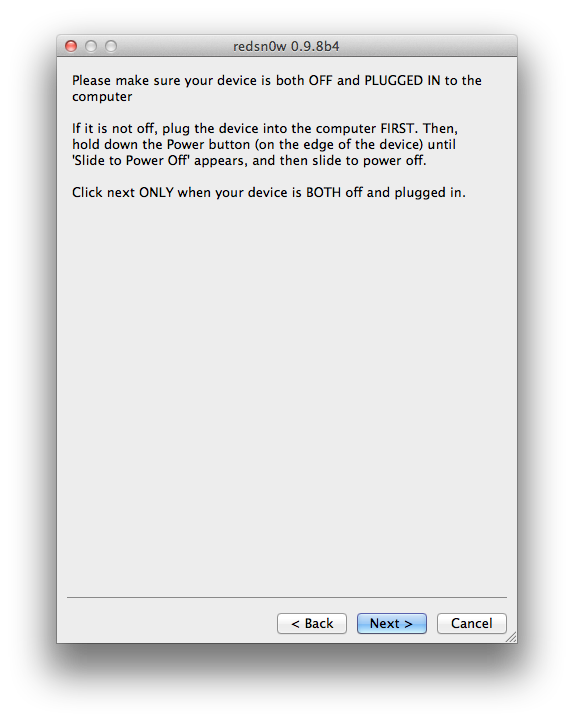
5. redsn0w will ask you to turn your device off. If it’s not already off, plug it in FIRST and then turn it off. Click next to continue

Click here to enlarge

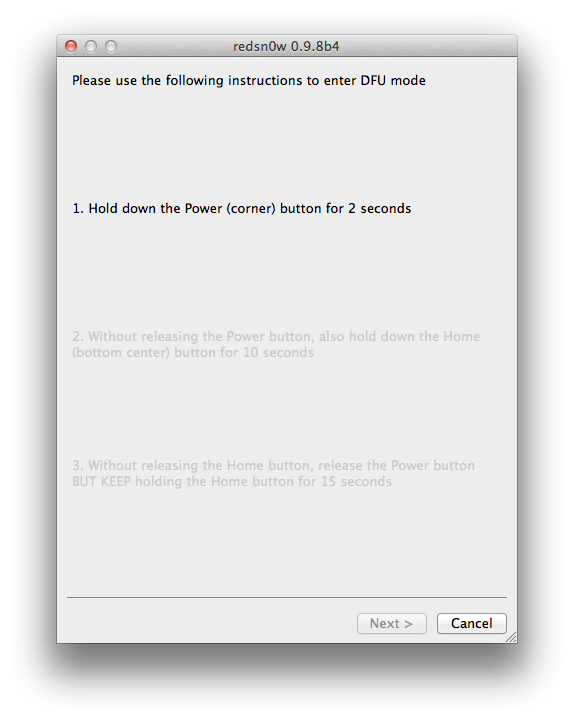
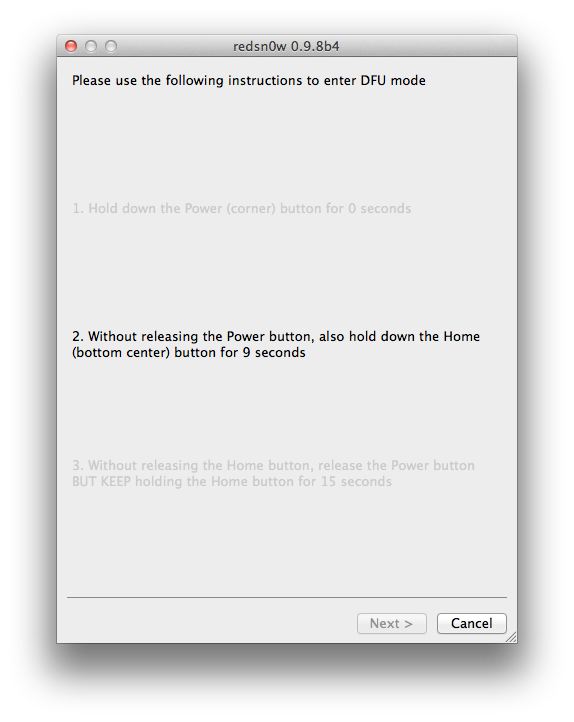
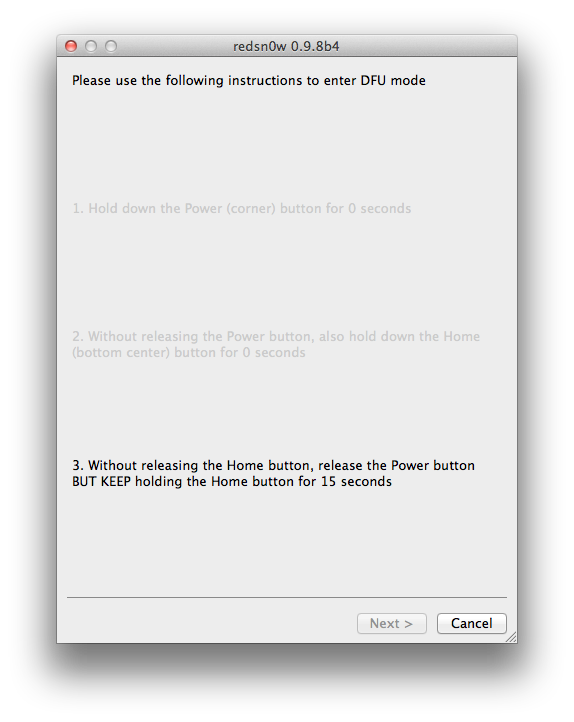
6. Now, you will need to put your device in DFU mode. Follow the instructions on the screen.

Click here to enlarge

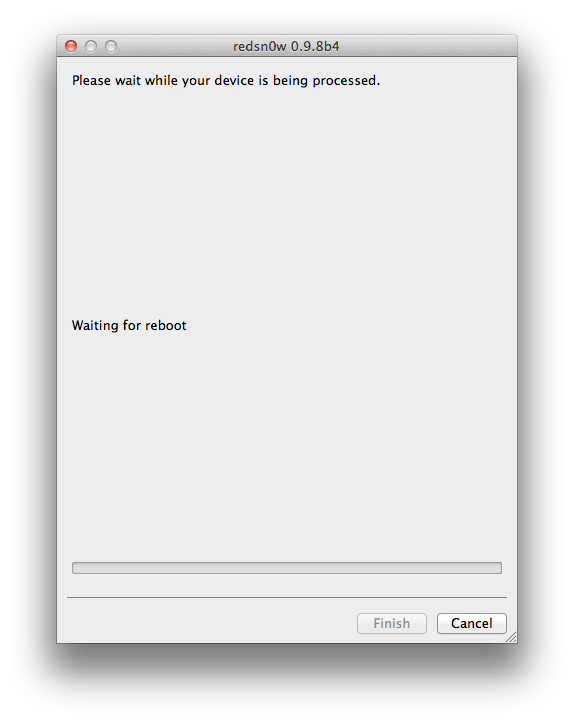
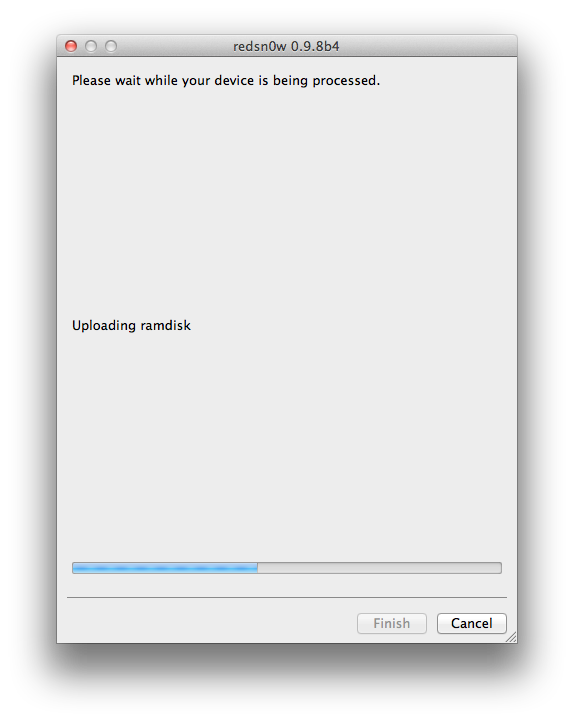
7. Wait a few seconds for redsn0w to do its thing, and you are done. You can close redsn0w because everything else it’s happening directly on the device.

Click here to enlarge


NOTE: Any Windows users seeing “Waiting for reboot” for too long (more than 20 seconds or so), please try “shaking” the JB process by unplugging then replugging your USB cable (while letting redsn0w continue to run). Also, try using a USB port “closer” to your computer (as opposed to on your monitor or behind another hub).
Read More..

Monday, October 14, 2013

Free language learning software


Free language learning software - Lingoversity is a complimentary of charge studying program by which can understand dialects very easily. With this free studying program, Lingoversity will be able to understand language, and movement, effectively and quickly. There is an option to look for for new term significance from web using this free program, Lingoversity. So studying language procedure, handling notices and planning r workbooks are done in an effective way using this program.

Thats not all can also take a back-up of r studying information which can be used slightly from any location thereby making studying terminology procedure more convenient for . Great free studying program, is not it. But always keep in mind to make a studying information before using this free program, Lingoversity. To understand a few common phrases of a terminology, can try Terms Memorizer.

First thing to do is to manage all r new words like addition, modifying etc with the help of the guide tab. After this fill the concept textbox with r new term and press button magnifying glass to see significance of the phrase joined by in on the internet dictionaries tab. can also look for the symbolism of words on the other hand in on the internet dictionaries like database. can also check out GiftedSpeech a complimentary of charge studying program for kids.

When five test is completed then can just begin studying them. It is very simple, There is a remember tab, just simply click on it and then click on begin. The new term is shown above and significance is shown below in different bins and have to choose correct significance from these different bins.

With thisfree studying software

can obtain individual guide information. These guide information enable to use this program for the terminology want to understand and also can assess r current level of expertise. can also take a look at the personal notices and words at ease using this free software as can build r own thesaurus as per r needs.

Source : http://www.ilovefreesoftware.com/17/windows/lingoversity-free-language-learning-software.html
Read More..

iPhone Tools v1 1 A Free iPhone Software Tool Pc


iPhone Tools

Screenshot:


Features:
  1. Carrier Checker
  2. Bulk Carrier Check
  3. IMEI Validation Offline
  4. IMEI Validation Online
  5. Apple Support And Service Checker
  6. Serial Checker
  7. iPhone Factory Unlocking Service
  8. Some Other Tools

Change Log:
V:1.1
-Registration in a easy way(Standalone/Free)
-Some bugs fixed

Download

.Net Framework 4

t Framework 4 Is Required. Otherwise Software May Gives
Read More..

AT T’s LTE network expanded to 10 new markets


attlogo
Some speedy new 4G LTE networks are in place around the U.S.
Which is never a bad thing.
Per AppleInsider, AT&T this week announced that its high-speed 4G LTE network — compatible with Apple’s latest iPhone 5, iPad and iPad mini — has launched in 15 new markets, and also expanded coverage in a handful of other locations.

A total of 10 new locations with 4G LTE reception were announced by AT&T on Friday:
- Boise, Idaho
- Boulder, Colo.
- Bowling Green, Ky.
- Harrisburg, Pa.
- Hartford, Conn.
- Lancaster, Pa.
- Lexington, Ken.
- New Haven, Conn.
- Ogden, Utah
- Providence, R.I.
Those 10 are joined by five other markets that AT&T announced have LTE connectivity on Tuesday of this week:
- Green Bay, Wis.
- Melbourne, Fla.
- Oxford, Miss.
- Springfield, Mass.
- Tucson, Ariz.
Finally, AT&T also announced this week that its existing 4G LTE network has expanded in a handful of markets. They are:
- Middlesex County, N.J.
- Phoenix, Ariz.
- Salt Lake City, Utah
- Los Angeles, Calif.

The latest expansions are the most significant update to AT&T’s network since mid-November, when the company’s 4G LTE coverage was extended to 24 new markets, including Denver, Colo., and Columbus, Ohio.

In all, AT&T’s 4G LTE network has been launched in 124 markets. The company plans to reach 250 million people by the end of 2013, and 300 million by the end of 2014.
Read More..

How to Jailbreak Your iPod Touch 4G Using RedSn0w Mac 5 0b4

These are instructions on how to jailbreak your iPod touch 4G on the 5.0b4 firmware using RedSn0w for Mac. Since iOS 5.0 has not yet been released these are instructions for developers only. This procedure will not hacktivate so you must have your UDID registered with a developer, and as of now the jailbreak is tethered.


Step One
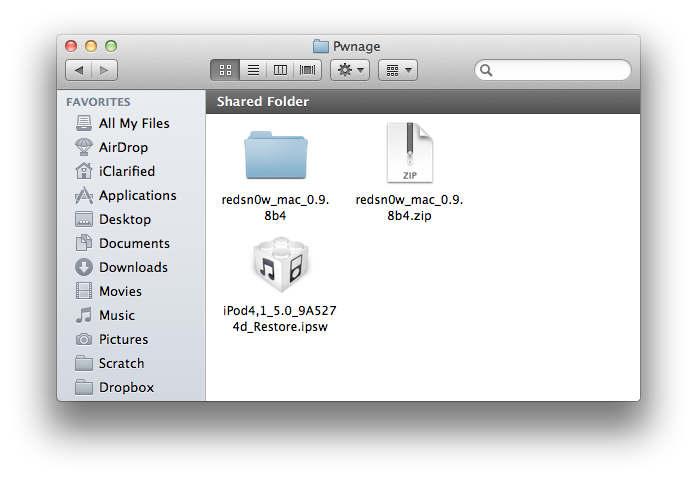
Create a folder on your desktop called Pwnage

Download RedSn0w from here and place it in the Pwnage folder. Likewise, download the latest 5.0 firmware from the iOS Dev Center and place it in the same folder.

5.0b4 (4G): iPod4,1_5.0_9A5274d_Restore.ipsw

Extract the RedSn0w zip file by double clicking it.

Click here to enlarge


Step Two
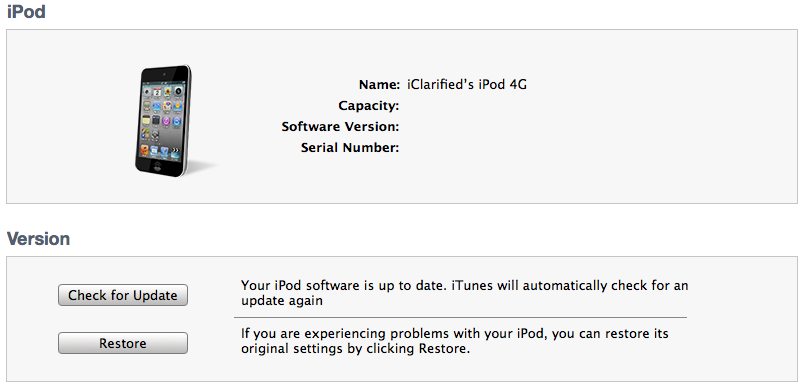
Connect your iPod to the computer and launch iTunes.

Click here to enlarge


Select your iPod from the list of devices on the left. Now hold down Option and click the Restore button. Restore is preferred as it wont create any wasted space on your iPod.


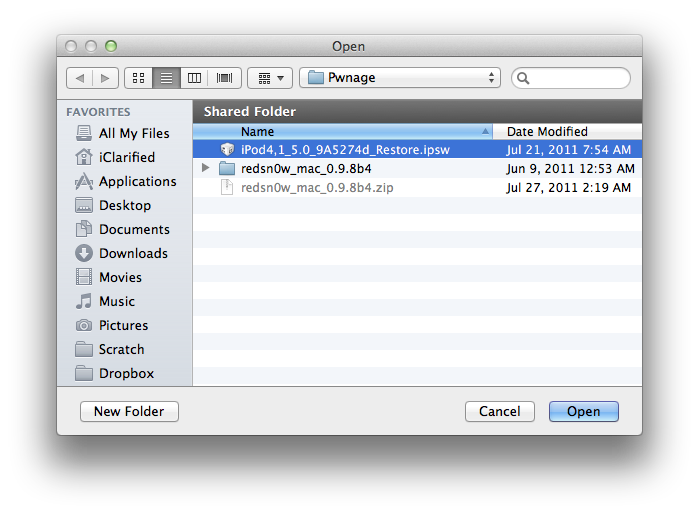
Click here to enlarge


Navigate to the Pwnage folder on your desktop and select the 5.0 firmware ipsw. Click the Choose button to continue.
Click here to enlarge

Step Three
Once iTunes has finished updating your iPod to the desired firmware open the Pwnage folder on your desktop and launch the redsn0w application from the redsn0w folder we extracted earlier.

Click here to enlarge

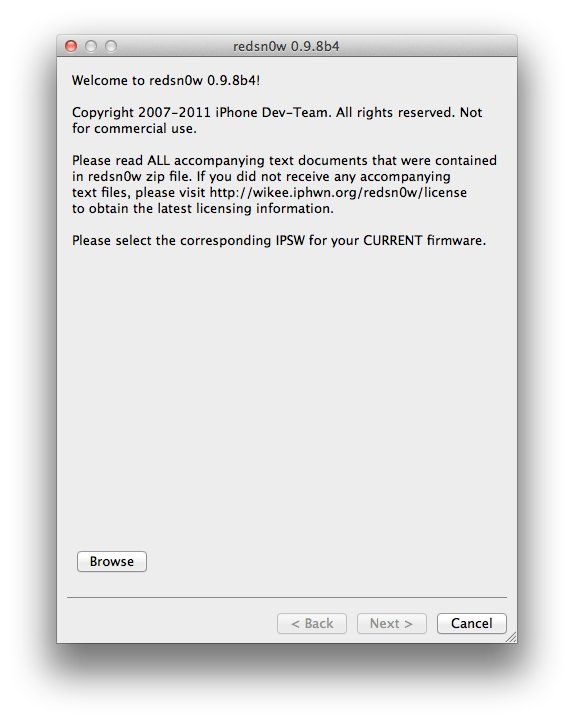
Step Four
Once RedSn0w opens click the Browse button

Click here to enlarge

Step Five
Select the 5.0 firmware ipsw we placed in the Pwnage folder on our desktop then click Open.

Click here to enlarge

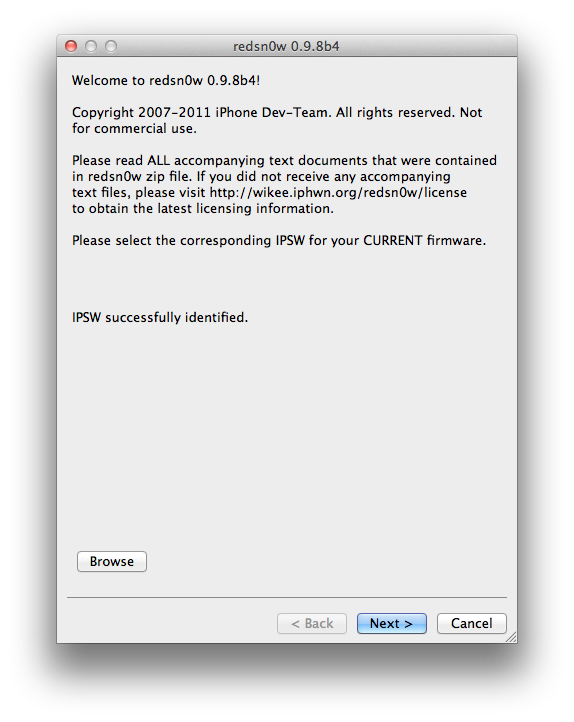
Step Six
Once the firmware has been verified click the Next button to continue.

Click here to enlarge

Step Seven
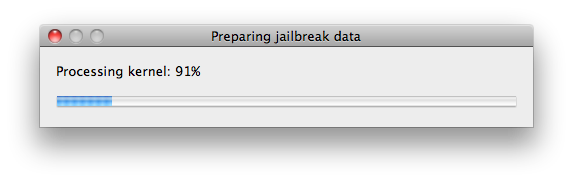
RedSn0w will now prepare the jailbreak data

Click here to enlarge

Step Eight
From this window you can select the jailbreak options you would like.

Make sure Cydia is selected and click the Next button to continue.

Click here to enlarge

Step Nine
Please plug your iPod into the computer and make sure its OFF then click the Next button

Click here to enlarge

Step Ten
RedSn0w will now guide you through the steps to get into DFU mode.
Click here to enlarge

Hold down both the Home button and the Power button for 10 seconds.
Click here to enlarge

Release the Power button and continue holding the Home button until RedSn0w detects the device.

Click here to enlarge

Step Eleven
Your iPod will now reboot

Click here to enlarge


Step Twelve
RedSn0w will then begin uploading the new RAM Disk and Kernel.

Click here to enlarge

Step Thirteen
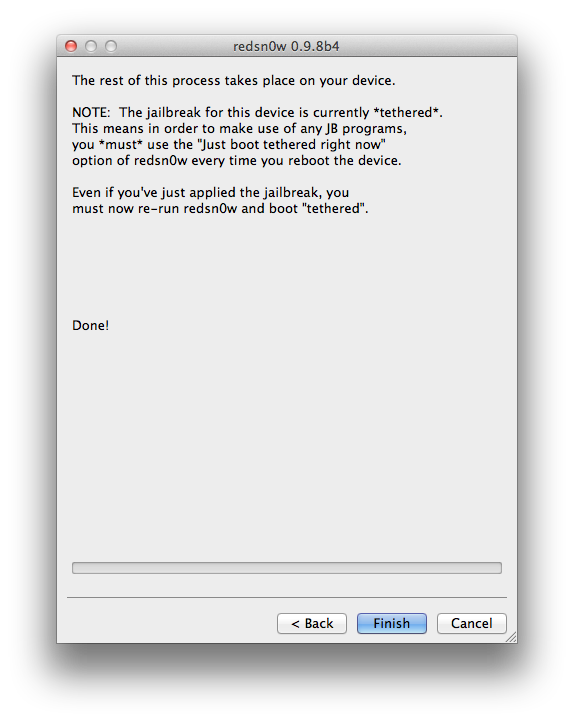
Once this is complete you will be notified that RedSn0w is done. Click the Finish button. When your iPod finishes rebooting (5 minutes or so) it will be jailbroken with Cydia on the SpringBoard.

Click here to enlarge


BOOT TETHERED:
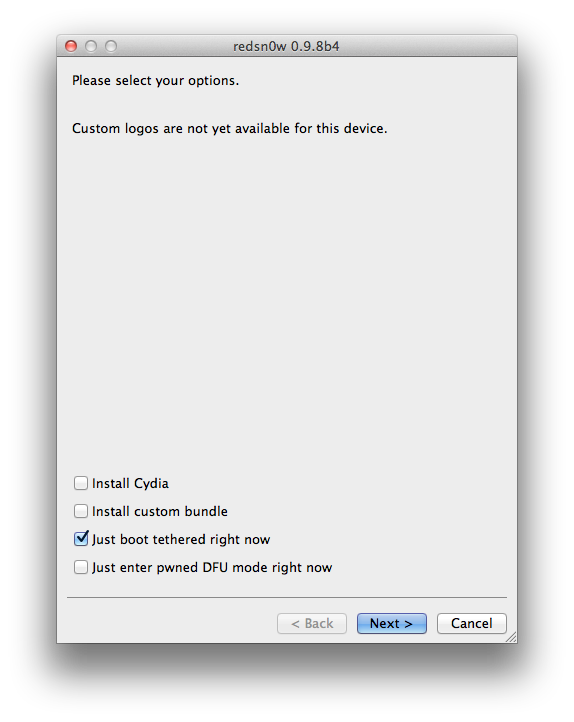
Since this is a tethered jailbreak you must use Redsn0w to help you boot back into your jailbroken device if its powered off for any reason. Simply connect your iPod to the computer, launch RedSn0w, select Just boot tethered right now from the options window and click Next to have RedSn0w boot your device.

Click here to enlarge

*A big thanks to the iPhone Dev-Team and Geohot for their hard work and contribution to the iPhone community.
Read More..